|
|
|
|
||||
|
Welcome to the GoFuckYourself.com - Adult Webmaster Forum forums. You are currently viewing our boards as a guest which gives you limited access to view most discussions and access our other features. By joining our free community you will have access to post topics, communicate privately with other members (PM), respond to polls, upload content and access many other special features. Registration is fast, simple and absolutely free so please, join our community today! If you have any problems with the registration process or your account login, please contact us. |

 |
|
|||||||
| Discuss what's fucking going on, and which programs are best and worst. One-time "program" announcements from "established" webmasters are allowed. |
|
|
Thread Tools |
 12-13-2025, 01:58 AM
|
#1 |
|
GFY'S #1 retard
Industry Role:
Join Date: Feb 2003
Location: Kelowna
Posts: 11,315
|
 Who on GFY has the most multi-monitor setup?
42" Widescreen 4k
24" Portrait 1080p Who on GFY is running the most monitors at once? I have 2 monitors but I want 1 more above my main screen and a 4th monitor to my left side! |

|


|
|
12-13-2025, 02:25 AM
|
#2 |
|
The FraudBuster
Industry Role:
Join Date: Aug 2024
Location: Brantford, Ontario
Posts: 648
|
49" Samsung super ultrawide up top
iPad 2nd gen sitting front and center under that, acts as my terminal display running Claude Code. I ditched the quad 27" displays last spring.
__________________
The Brantford Insider |
|
|
|
|
12-13-2025, 02:51 AM
|
#3 | |
|
GFY'S #1 retard
Industry Role:
Join Date: Feb 2003
Location: Kelowna
Posts: 11,315
|

Quote:
|
|
|
|
|
|
12-13-2025, 04:27 AM
|
#4 |
|
bored

Industry Role:
Join Date: Aug 2003
Location: PORNCMS.com
Posts: 4,837
|
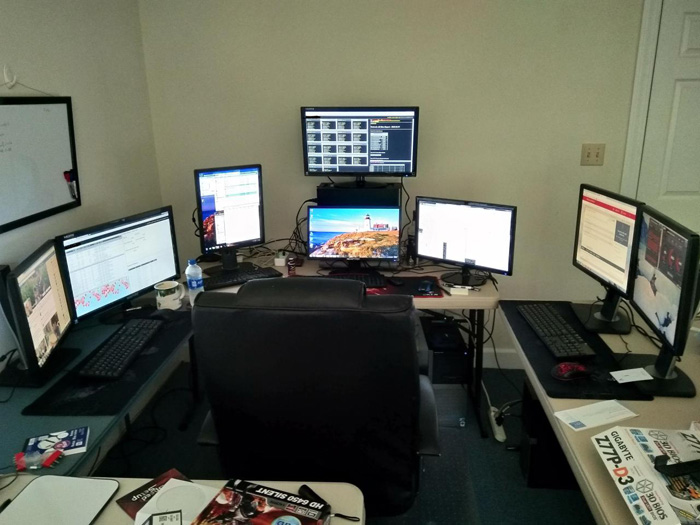
this was my desk when i was running 3 companies. now i only run two so i don't have the right side anymore. i only have 5 monitors.
 my wife on the other hand has a 7 monitor setup with a 32 inch main display and 2 ipads on stands because she's a crypto & XAU trader 24/7. she makes a shitload more than me  most of my time now is spent lifeguarding my Koi pond and drinking rice whiskey unless the stock market is open... 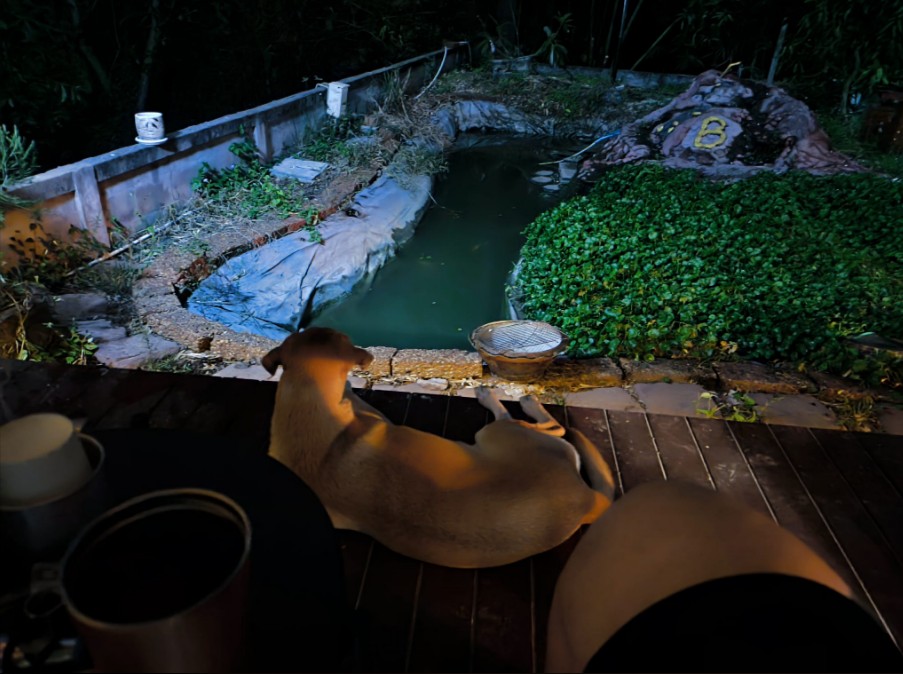 #porncms |
|
|
|
|
12-13-2025, 06:16 AM
|
#5 |
|
Too lazy to wipe my ass

Industry Role:
Join Date: Aug 2002
Location: A Public Bathroom
Posts: 38,726
|
I'm on a 32inch curved 4K and a 24inch vertical 1080p directly to the left. Then there's the mac, running on a 4K 27inch, but thats on another desk...
|

|
|
|
12-13-2025, 06:17 AM
|
#6 |
|
Natalie K

Industry Role:
Join Date: Apr 2010
Location: Spain
Posts: 19,714
|
we just use the 2 laptops now...
still have a 42" Panasonic & 24" monitor that can be used, just sat in spare room. It´s nicer for us sitting together in lounge, working cam, updating websites and doing our thing 
__________________
My official site  Custom vids Custom vids  Make money & get into the business Make money & get into the business First time girls First time girlsSkype: GspotProductions - "Converting traffic into income since 2005" |
|
|
|
|
12-13-2025, 07:51 AM
|
#7 |
|
Jägermeister Test Pilot

Industry Role:
Join Date: Dec 2001
Location: NORCAL
Posts: 74,788
|
I just run single 49 inch Samsung Odyssey monitor.
I used to do the multiple monitor thing and it's just extra work. One large monitor and I can split it up into three monitors.
__________________
“The choice is no longer between right or left. The choice is between normal and crazy.” - Sarah Huckabee Sanders YNOT MAIL | THE BEST ADULT MAILING SOLUTION |
|
|
|
|
12-13-2025, 10:41 AM
|
#8 |
|
making it rain

Industry Role:
Join Date: Oct 2003
Location: seattle
Posts: 22,183
|
Just a 37" 21:9 ultrawide. Important shit goes in the center, turning your head is bad for the spine
 |
|
|
|
|
12-13-2025, 07:31 PM
|
#9 |
|
👏 REVOLUTIONARY 👏

Industry Role:
Join Date: Oct 2012
Posts: 2,421
|
I got 3 27-inch 4K LG displays running off my 16-inch M1 Max MacBook Pro, 2 27-inch 4K Dell displays hook up to my tower PC. And an 12-inch iPad Pro.
__________________

|
|
|
|
|
12-13-2025, 10:03 PM
|
#11 |
|
Confirmed User
Industry Role:
Join Date: Sep 2013
Posts: 349
|
One Samsung Odyssey 57" is all I need now although I'd still like something very slightly bigger
 No bezels to worry about which makes a huge difference, constant color, and no weird potential scaling issues if using more than than one monitor. |
|
|
|
|
12-14-2025, 08:24 AM
|
#12 | |
|
Natalie K
Industry Role:
Join Date: Apr 2010
Location: Spain
Posts: 19,714
|
Quote:
__________________
My official site Custom vids Make money & get into the businessFirst time girlsSkype: GspotProductions - "Converting traffic into income since 2005" |
|
|
|
|
|
12-14-2025, 01:52 PM
|
#13 | |
|
👏 REVOLUTIONARY 👏
Industry Role:
Join Date: Oct 2012
Posts: 2,421
|
Quote:
__________________
|
|
|
|
|
|
12-14-2025, 06:40 PM
|
#14 | |
|
GFY'S #1 retard
Industry Role:
Join Date: Feb 2003
Location: Kelowna
Posts: 11,315
|
Quote:
 |
|
|
|
|
|
12-14-2025, 06:43 PM
|
#15 | |
|
GFY'S #1 retard
Industry Role:
Join Date: Feb 2003
Location: Kelowna
Posts: 11,315
|
Quote:
I had to get a 2nd monitor because Windows 11 does NOT have a "show desktop" shortcut. If I have a bunch of tabs and shit and apps open, it's a massive pain... keeping project worklist & notes on the 2nd screen along with frequently used files and folders is the easiest solution. Fuck Windows 11!!!!!! Multi-monitor setups, for me, is the best way to multi-task without battling the OS to keep the work flowing. Removing the right-click taskbar "show desktop" in Windows 11 was retarded. |
|
|
|
|
|
12-14-2025, 08:51 PM
|
#16 |
|
Masterbaiter

Industry Role:
Join Date: Feb 2006
Posts: 27,139
|
I do, nothing special tho. Big ole flat screen TV that was sitting in the basement connected to the laptop via HDMI. Don't even know the size, shit big as hell tho (pause).
I do everything on the big screen, split it up when needed. Laptop sits there on a cool little laptop stand looking cute. Keep folders over there or sometimes a video playing or monitoring something while doing some whole other shit. |
|
|
|
|
12-14-2025, 09:09 PM
|
#17 | |
|
GFY'S #1 retard
Industry Role:
Join Date: Feb 2003
Location: Kelowna
Posts: 11,315
|
Quote:
Oh man I forgot where I saw it but I saw a dual ultra-ultra widescreen setup that basically wrapped the user in a 270 degree wall of monitor, looked crazy! |
|
|
|
|
|
12-15-2025, 09:51 AM
|
#18 |
|
Amateurs.com

Industry Role:
Join Date: May 2012
Posts: 1,375
|
I started working in 2001 with a laptop on my bed...25 years later I still have a laptop on my bed.
I changed the laptop a few times since then...and I do change beds, too.
__________________
Amateurs.com - #1 Amateur Social Network Teams ID: Amateurs.com CzechProfits - 34 paysites, 2000+ exclusive videos |
|
|
|
|
12-15-2025, 10:38 AM
|
#19 |
|
Too lazy to set a custom title
Industry Role:
Join Date: Dec 2004
Location: Happy in the dark.
Posts: 93,915
|
I do one thing at the time like the manly man I am . . .
__________________
Vacares - Web Hosting, Domains, O365, Security & More - Paxum and BTC Accepted Windows VPS now available Great for TSS, Nifty Stats, remote work, virtual assistants, etc. |
|
|
|
|
12-15-2025, 11:05 AM
|
#20 | |
|
The FraudBuster
Industry Role:
Join Date: Aug 2024
Location: Brantford, Ontario
Posts: 648
|
Quote:
Seems perfect for where I sit, occupies my entire horizontal field of vision without turning my head.. although I still turn slightly to see things at the screen edges clearly.
__________________
The Brantford Insider |
|
|
|
|
|
12-15-2025, 12:28 PM
|
#21 | ||
|
making it rain
Industry Role:
Join Date: Oct 2003
Location: seattle
Posts: 22,183
|
Quote:
Quote:
 |
||
|
|
|
|
12-15-2025, 12:42 PM
|
#22 | |
|
👏 REVOLUTIONARY 👏
Industry Role:
Join Date: Oct 2012
Posts: 2,421
|
Quote:
__________________
|
|
|
|
|
|
12-15-2025, 01:55 PM
|
#23 | |
|
Natalie K
Industry Role:
Join Date: Apr 2010
Location: Spain
Posts: 19,714
|
Quote:
__________________
My official site Custom vids Make money & get into the businessFirst time girlsSkype: GspotProductions - "Converting traffic into income since 2005" |
|
|
|
|
|
12-16-2025, 12:11 PM
|
#24 | |
|
Confirmed User

Join Date: Jun 2005
Location: EU
Posts: 284
|
Quote:
To show the desktop, use the shortcut Windows key + D, which minimizes all open windows and restores them when pressed again; alternatively, click the tiny bar at the far-right corner of the taskbar, or enable "Peek at desktop" in Taskbar settings to hover over it. Keyboard Shortcuts Win + D: Minimizes all windows to show the desktop and restores them when pressed again (Toggle). Win + M: Minimizes all windows (doesn't restore them). Win + Shift + M: Restores minimized windows after using Win + M. Win + , (Comma): Peeks at the desktop by temporarily clearing windows (useful in Windows 11). Mouse/Touchpad Methods Click the Taskbar Corner: Click the thin line or button on the far right of the taskbar (next to the date/time) to show the desktop. Peek at Desktop (Windows 10): Hover your mouse over the far-right corner of the taskbar to temporarily see the desktop. Touchpad Gesture (Windows 11): Drag up with three fingers on a touchpad to peek. Enable/Disable Taskbar Button (Windows 11) Right-click the Taskbar and select Taskbar settings. Go to Personalization > Taskbar. Expand Taskbar behaviors. Check or uncheck "Select the far corner of the taskbar to show the desktop". Where's Desktop icon on Windows 11 taskbar? - Microsoft Q&A You can view Your desktop by clicking the bottom right corner on the right of the Date and Time or by pressing the Windows and D k... Microsoft Learn Keyboard shortcuts in Windows - Microsoft Support Table_title: Windows key keyboard shortcuts Table_content: header: | Press this key: | To do this action: | row: | Press this key: Microsoft Support How to show the desktop on Windows 11 Keyboard shortcut The operating system offers at least two keyboard shortcuts to show the desktop: Windows key + D: If you press t... Windows Central Show all Dive deeper in AI Mode and Win+D is my preferred way
__________________

|
|
|
|
|