
How can I tell which wi-fi standard my Macbook can use? I think it's probably 802.11g but there's a chance it's 802.11n
-
- Free Premium Domain Lists and Tools at Clickmojo.com
- For Sale: Obscenity.com
-
which model macbook is it -
http://www.apple.com/macbook/specs.html
Built-in AirPort Extreme Wi-Fi wireless networking (based on IEEE 802.11n draft specification); IEEE 802.11a/b/g compatibleComment
-
I did see the new ones are 802.11n but mine is a year or two old now. I'm not sure if mine is and I couldn't find it in the System Preferences or System Profiler. It should be somewhere. I'd like to figure it out without having to dig out the box it came in.- Free Premium Domain Lists and Tools at Clickmojo.com
- For Sale: Obscenity.com
Comment
-
Brujah, Check the 'about this mac' -> more info -> 'Airport card'
Then compare the wireless card type on google. and boom.
Example: Here's mine.
Wireless Card Type: AirPort Extreme (0x14E4, 0x8C)
Wireless Card Locale: Asia Pacific
Wireless Card Firmware Version: Broadcom BCM43xx 1.0 (4.170.46.9)
Current Wireless Network: rhcp's Network
Wireless Channel: 1Skype rhcp011235 | Cell Phone 212.812.9043 | Email [email protected]Comment
-
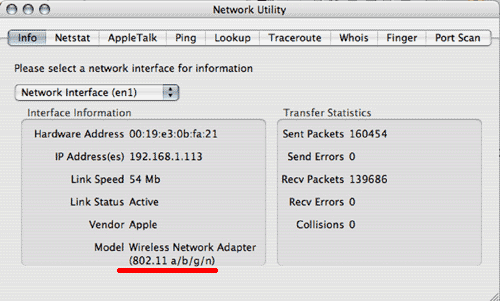
I found it, using Network Utility and looking at the en1. I have the 802.11g, not the 802.11n. This screenshot below isn't mine.
- Free Premium Domain Lists and Tools at Clickmojo.com
- For Sale: Obscenity.com
Comment
-
Depending on the model of your unit. Apple sells a airport 802.11N enabler.
If its a macbook pro. Chances are you might be able to use it.
Also, if you really want 802.11N you can buy the card and pop it in.
Btw, hook up some celeb traffic ;) send those goth 404's my way :PSkype rhcp011235 | Cell Phone 212.812.9043 | Email [email protected]Comment
-
I bought a Time Capsule. It's 802.11n, so I'll probably upgrade my macbook and take advantage of the speed increase.- Free Premium Domain Lists and Tools at Clickmojo.com
- For Sale: Obscenity.com
Comment
-
Nice. Time capsule is nice. I got one of those + airport express running in 'WTS' mode to extend my network.
Plus. I got 3 macbooks syncing to it. it's a nice toy. You wont notice the 802.11N though. Unless you are xfering large files wirelessly on local lan. Unless, you got one hell of a internet connection at home ;)Skype rhcp011235 | Cell Phone 212.812.9043 | Email [email protected]Comment
-
-
I'm using the time machine as both a router + back-up device for 3 macbooks.Skype rhcp011235 | Cell Phone 212.812.9043 | Email [email protected]Comment
-
You have your Time Capsule connected to your cable modem? I have a linksys already acting as a router and I'm using third party firmware which is much better. I connected my TC to my existing wireless network. I'll take advantage of the 802.11n when I upgrade the Macbook since it's only 802.11g at the moment anyway.- Free Premium Domain Lists and Tools at Clickmojo.com
- For Sale: Obscenity.com
Comment
-
I'm using it direct connected to my shitty dsl line.
If you connected the TC wired to the linksys you can take advantage. if you are doing wifi sharing you cant. The linksys CAN do 'WDS" sharing with the TC. If you are interested in using the TC as a access point.Skype rhcp011235 | Cell Phone 212.812.9043 | Email [email protected]Comment

Comment