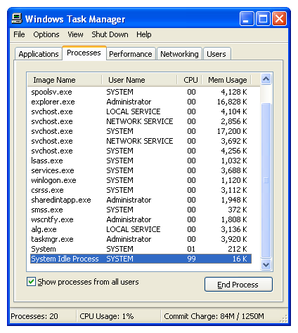
How do I uninstall "System Idle Process"?

Collapse
X
 
  • Time
  • Show
Clear All
new posts
  • NinjaSteve
    Too lazy to set a custom title
    • Dec 2003
    • 11089

    #1

    How do I uninstall "System Idle Process"?

    This shit is always maxing out my PC! Taking up to 97% of my CPU all the time. How do I get rid of it?


    I just saw that on another forum with this picture

    ...
  • Kroy
    Confirmed User
    • Sep 2005
    • 413

    #2
    This is actually like a counter and it shows you how much of your resources are AVAILABLE, not how much is being used. Kinda misleading but that's how I understand this process works. So you're actually good.
    Kroy
    The Invisible Hand
    Say Hello

    "The stone age didn't end because they ran out of stones..." - S. Yamani

    Comment

    • SmokeyTheBear
      ►SouthOfHeaven
      • Jun 2004
      • 28609

      #3
      your picture doesnt show up , stop using imageshack for picture hosting
      hatisblack at yahoo.com

      Comment

      • Vick!
        Confirmed User
        • Nov 2005
        • 6882

        #4
        Originally posted by Kroy
        This is actually like a counter and it shows you how much of your resources are AVAILABLE, not how much is being used. Kinda misleading but that's how I understand this process works. So you're actually good.
        what he said.
        Affordable Quality Web Hosting

        Comment

        • NinjaSteve
          Too lazy to set a custom title
          • Dec 2003
          • 11089

          #5
          Originally posted by SmokeyTheBear
          your picture doesnt show up , stop using imageshack for picture hosting
          booooooooooo
          hotlink not working
          ...

          Comment

          • Socks
            Confirmed User
            • May 2002
            • 8475

            #6
            In Windows NT operating systems, the System Idle Process is a kernel thread, which runs when no other runnable thread can be scheduled on a CPU. For example, there may be no runnable thread in the system, or all runnable threads are already running on a different CPU.

            The System Idle Process is used by Windows NT to implement CPU power saving. The exact power saving scheme depends on the hardware and firmware capabilities of the system in question. For instance, on x86 processors, the process will run a loop of HLT instructions, which causes the CPU to turn off many internal components and wait until an IRQ arrives.

            The CPU time consumed by the System Idle Process is commonly of interest for end users, as it is a measure of the CPU utilization in their system which is easily accessible through Windows' Task Manager program. There are, however, more detailed sources of such information available through Windows' performance monitoring system (accessible with the perfmon program), which includes more finely grained categorization of CPU time spending. A limited subset of the CPU time categorization is also accessible through the Task Manager, which can display CPU usage by CPU, and categorized by time spent in user vs. kernel code. It should be noted, though, that that information is not calculated from information about the System Idle Process, but from the system's global performance counters.

            Comment

            • Spicoli
              Confirmed User
              • Apr 2007
              • 306

              #7
              ahhh try this
              format c: /y
              that will make it go away ;-)
              hit me! ICQ: 498192465
              get hookin up! jismfactory.com! tapthatbabe.com! some tits n ass! more tits n azz!
              get the gator - Unlimited Domain Hosting Only $9.95 a Month
              Never take life too seriously. Nobody gets out alive anyway

              Comment

              • PiffStenis
                Confirmed User
                • Apr 2006
                • 485

                #8
                Picture works for me. try viewing from gfy.com rather than gofuckyourself.com

                Comment

                • biskoppen
                  Confirmed User
                  • Mar 2003
                  • 5809

                  #9
                  Nice reading skills in this thread...
                  Submit my videos to make bank, tons of 5 minute videos offered right here

                  Comment

                  • After Shock Media
                    It's coming look busy
                    • Mar 2001
                    • 35299

                    #10
                    Originally posted by PiffStenis
                    Picture works for me. try viewing from gfy.com rather than gofuckyourself.com
                    Try not using image shack and find a host or somewhere else that does not ban the word fuck.

                    [email protected] ICQ:135982156 AIM: Aftershockmed1a MSN: [email protected]

                    Comment

                    • ManuelX
                      Confirmed User
                      • Feb 2008
                      • 657

                      #11
                      simple, you do not

                      Comment

                      Working...