Computer help?!?!

Collapse
X
 
  • Time
  • Show
Clear All
new posts
  • TinCan
    Confirmed User
    • Dec 2003
    • 148

    #1

    Computer help?!?!

    Ok so my computer has been messing up lately and I have no idea whats wrong with it. I want to try and figure out what it is before I give up and just buy a brand new computer. Anyone know what the problem could be when this screen comes up? It doesnt do anything after that. I would have to manually reboot and the screen would come back up.
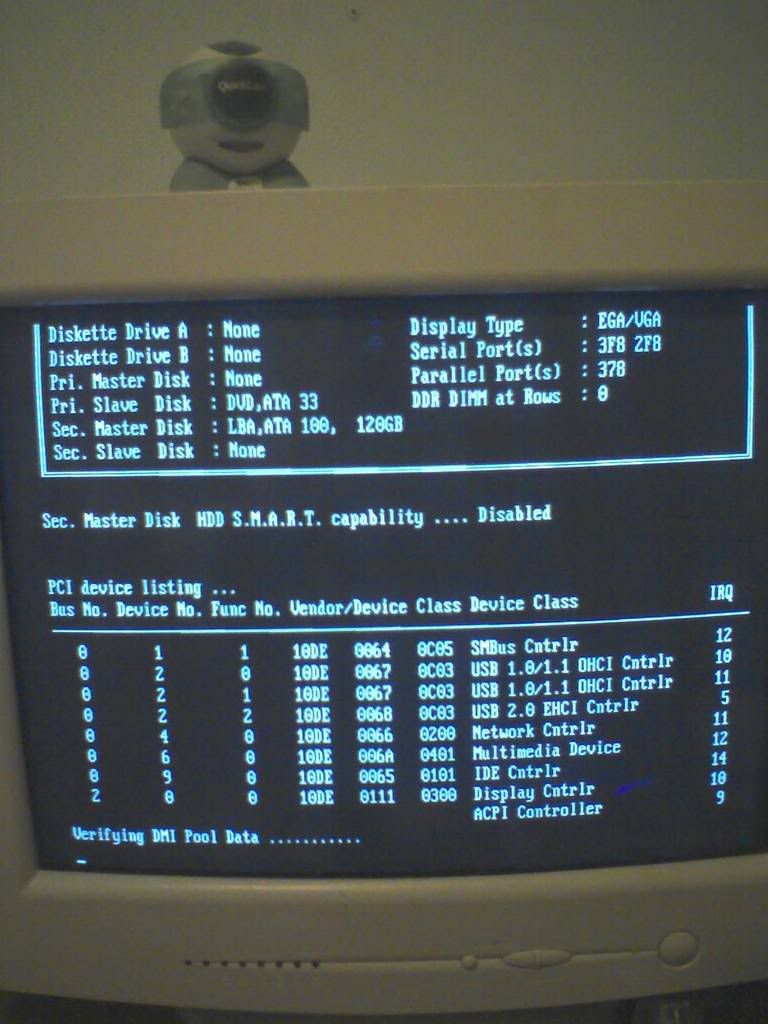


    Im thinkin it could be my hard drive but for some reason I doubt it. It could also be the motherboard but im not for sure. Anyone know? Thanks in advanced.
  • Fap
    Just Du It
    • Feb 2004
    • 12094

    #2
    Quit running MS DOS

    Comment

    • LiveDose
      Show Yer Tits!
      • Feb 2002
      • 25792

      #3
      My inlaws computer is doing something similar. I think something is corrupt on the harddrive, file or surface damage. I was going to swap the drive into a case and install a new drive and do a system restore. Then see what I can get off of the old drive. This is why I'm not a techie, LOL...

      Scammer Alert: acer19 acer [email protected] [email protected] Money stolen using PayPal

      Comment

      • ner0
        Registered User
        • Aug 2006
        • 32

        #4
        Your hard drive is gone. See where it says Primary master: None? I hope you had everything backed up

        Comment

        • ztik
          Confirmed User
          • Aug 2001
          • 5196

          #5
          Just reset your cmos man (the lil jumper next to your battery)

          usualy does the trick

          It is possible your HD died, but normally it'll say it can't read it, or read disk error, ect..
          .

          Comment

          • ztik
            Confirmed User
            • Aug 2001
            • 5196

            #6
            Also, you can go into your bios and see if it detects your HD

            Looking at the pic more.. Why do you not have a primary drive? Are you supposed to have 2 hard drives or just one?
            .

            Comment

            • Spunky
              I need a beer
              • Jun 2002
              • 133986

              #7
              Did you get hard drive errors on previous start ups? Usually they show them first

              Comment

              • TinCan
                Confirmed User
                • Dec 2003
                • 148

                #8
                Nope im getting no hard drive errors. Ive had a hard drive fail on me before and it gave me errors. And in bios it looks like its reading everything including the hard drive.

                Comment

                • ztik
                  Confirmed User
                  • Aug 2001
                  • 5196

                  #9
                  So you are only supposed to have 1 HD and 1 DVD drive then? If so, reboot your bios with the jumper. Also you may try check to be sure your cables are secure, you may also need new cables. It could also be memory, so many things.. Id try reboot first..
                  .

                  Comment

                  • TinCan
                    Confirmed User
                    • Dec 2003
                    • 148

                    #10
                    Originally posted by ztik
                    So you are only supposed to have 1 HD and 1 DVD drive then? If so, reboot your bios with the jumper. Also you may try check to be sure your cables are secure, you may also need new cables. It could also be memory, so many things.. Id try reboot first..
                    Yea 1 hd and 1 cd/dvd drive. I know its in the secondary master but it has worked fine for a while up until a couple months ago.

                    Comment

                    • Spunky
                      I need a beer
                      • Jun 2002
                      • 133986

                      #11
                      Could be a power supply

                      Comment

                      • TinCan
                        Confirmed User
                        • Dec 2003
                        • 148

                        #12
                        Originally posted by Spunky
                        Could be a power supply
                        Nah i fried a power supply before too so im pretty sure its not it.

                        Comment

                        • VeriSexy
                          Join The Royal Family
                          • Apr 2002
                          • 25463

                          #13
                          your hd does not detect, if you unplug your hd you'll get the exact same screen
                          Looking for a KICK ASS TEEN SPONSOR? Check out ROYAL CASH - THE KING OF TEEN!
                          Incredible webmaster tools FHGs, Morphing Blog and RSS Feeds, Embedded FLV & WMV Videos
                          .
                          With TOP RATIO Sites like


                          ATMovs.com | iTeenVideo.com |
                          TeenSexMovs.com | TeenSexMania.com


                          Comment

                          • TinCan
                            Confirmed User
                            • Dec 2003
                            • 148

                            #14
                            Originally posted by VeriSexy
                            your hd does not detect, if you unplug your hd you'll get the exact same screen
                            I did not think of this and u are totally right. It is my hard drive. Thanks alot man! Good thing everything was backed up except a password that i need, but i could live without.

                            Comment

                            Working...