WP Gallery Plugin Recommendations

Collapse
X
 
  • Time
  • Show
Clear All
new posts
  • armysmoke
    Confirmed User
    • Oct 2013
    • 2606

    #1

    WP Gallery Plugin Recommendations

    I'm trying to get away from tube sites and started two new blogs (ebony and schoolgirl).

    What is a good WP plugin to use for galleries?

    Thanks in advance.
  • fris
    Too lazy to set a custom title
    • Aug 2002
    • 55679

    #2
    built in one is fine ;)
    Since 1999: 69 Adult Industry awards for Best Hosting Company and professional excellence.

    Comment

    • Horny Dude
      Earn enough to buy coffee
      • May 2002
      • 4913

      #3
      This is the best one on the market, IMO.
      Justified Image Grid

      Comment

      • brassmonkey
        Pay It Forward
        • Sep 2005
        • 77396

        #4
        Originally posted by armysmoke
        I'm trying to get away from tube sites and started two new blogs (ebony and schoolgirl).

        What is a good WP plugin to use for galleries?

        Thanks in advance.

        if you have cash i have something good design is free! ill email you
        TRUMP 2026 KEKAW!!! - The Laken Riley Act Is Law!
        DACA ENDED - SUPPORT AZ HCR 2060 52R - email: brassballz-at-techie.com

        Comment

        • armysmoke
          Confirmed User
          • Oct 2013
          • 2606

          #5
          Originally posted by fris
          built in one is fine ;)
          Hi Fris,

          The problem with the built in WP one is that it shows all the thumbs on the front page.

          http://xschoolgirls.com/ (the newest post).

          I want it to show one on the main page and then the rest when the image is clicked.

          Is this a theme issue?

          Or am I doing something wrong.

          Comment

          • armysmoke
            Confirmed User
            • Oct 2013
            • 2606

            #6
            Originally posted by brassmonkey
            if you have cash i have something good design is free! ill email you
            Waiting for your email.

            Comment

            • just a punk
              So fuckin' bored
              • Jun 2003
              • 32393

              #7
              Originally posted by armysmoke
              Hi Fris,

              The problem with the built in WP one is that it shows all the thumbs on the front page.

              http://xschoolgirls.com/ (the newest post).

              I want it to show one on the main page and then the rest when the image is clicked.

              Is this a theme issue?

              Or am I doing something wrong.
              The should be done via a WP theme, but not a gallery plugin. Take a look at these image themes: http://adultsiteskins.com/ - they are working exactly like you want. The main page shows featured image (post thumbnails) only, while the gallery pages display all the images.

              BTW, you can use the CyberSEO plugin (see sing) to automatically populate such gallery sites with image galleries from sponsor hosted RSS feeds. Here is an example of such a site: babesat.com - it's powered by my plugin and works on 100% autopilot (no manual input at all).
              Obey the Cowgod

              Comment

              • just a punk
                So fuckin' bored
                • Jun 2003
                • 32393

                #8
                http://gfy.com/showthread.php?t=1140405
                Obey the Cowgod

                Comment

                • fris
                  Too lazy to set a custom title
                  • Aug 2002
                  • 55679

                  #9
                  Originally posted by armysmoke
                  Hi Fris,

                  The problem with the built in WP one is that it shows all the thumbs on the front page.

                  http://xschoolgirls.com/ (the newest post).

                  I want it to show one on the main page and then the rest when the image is clicked.

                  Is this a theme issue?

                  Or am I doing something wrong.
                  its just a matter of integrating what you want in your template, you would add the 1 image in your front pager part, then for single you would do something different full gallery. kinda like i did with kibble.

                  front page

                  http://dogpics.ca/

                  gallery page

                  http://dogpics.ca/new-age-music.html
                  Since 1999: 69 Adult Industry awards for Best Hosting Company and professional excellence.

                  Comment

                  • armysmoke
                    Confirmed User
                    • Oct 2013
                    • 2606

                    #10
                    Originally posted by fris
                    its just a matter of integrating what you want in your template, you would add the 1 image in your front pager part, then for single you would do something different full gallery. kinda like i did with kibble.

                    front page

                    http://dogpics.ca/

                    gallery page

                    http://dogpics.ca/new-age-music.html
                    Exactly. How do I do something like this?

                    Comment

                    • fris
                      Too lazy to set a custom title
                      • Aug 2002
                      • 55679

                      #11
                      Originally posted by armysmoke
                      Exactly. How do I do something like this?
                      can you email me what your theme looks like?

                      [email protected]
                      Since 1999: 69 Adult Industry awards for Best Hosting Company and professional excellence.

                      Comment

                      • armysmoke
                        Confirmed User
                        • Oct 2013
                        • 2606

                        #12
                        Originally posted by fris
                        can you email me what your theme looks like?

                        [email protected]
                        Email sent!

                        Comment

                        • Tube Ace
                          So Fucking Banned
                          • Nov 2008
                          • 4941

                          #13
                          AdultGalleryPress - Import FHGs or Create a New Gallery in WordPress - Responsive Theme & Plugin

                          Comment

                          • Tube Ace
                            So Fucking Banned
                            • Nov 2008
                            • 4941

                            #14


                            AdultGalleryPress - Adult Photo & Movie Gallery WordPress Theme + Plugin

                            View Live Demo


                            Includes Responsive HTML5 (Bootstrap CSS Framework) WordPress Theme - Desktop / Tablet / Mobile Ready!
                            Fluid theme page layouts are a must these days with all the available devices and screen sizes. The AdultGallryPress WordPress theme is built on the popular Twitter Boostrap 3 CSS framework. This means no page redirects are necessary for the best user experience on any device. Extremely SEO Friendly!

                            Theme Customizer
                            Using the native WordPress Theme Customizer you can easily edit the colors of body text, backgrounds, links, tags, menu items of the header, content area, and sidebar.

                            Theme Options
                            From the WordPress admin, you can quickly change the content layout style, sidebar width and alignment (left or right of main content), gallery previews (thumbnails, titles) and gallery pages (of those self-hosted).

                            Custom Widgets & Widget Areas
                            The theme has 3 widget areas: header, sidebar and footer. Widget areas allow you to drag-and-drop elements such as advertisement blocks, galleries, lists, and forms into your site layout. AdultGalleryPress includes 2 custom widgets: Model List and Site List which are very useful to users for navigation.

                            Includes WordPress Plugin to Bulk Import FHGs or Create New Galleries from ZIP files
                            Hundreds of Adult Sponsors (Affiliate Networks) offer Free Hosted Galleries with Photos and Videos for affiliates to use as promotional tools. AdultGalleryPress makes it amazingly easy to import these money-making galleries into your WordPress blog.

                            Plugin works with any WordPress Theme!
                            Choose from tens of thousands existing WordPress themes or add the plugin to your existing WordPress blog. The galleries are added as regular WordPress posts (i.e. Post Type).

                            Photo galleries use Lightbox2 or can be set to link directly to sponsor URL.

                            Movie galleries use an embedded flowplayer for video files.

                            Self-hosted gallery pages display: Related Galleries, Category, Site, Model and Tags

                            Sample Self-Hosted Photo Gallery: View Live Demo
                            Sample Self-Hosted Movie Gallery: View Live Demo

                            + Unlimited domain license
                            + Free lifetime upgrades

                            AdultGalleryPress - Adult Photo & Movie Gallery WordPress Theme + Plugin

                            Comment

                            • just a punk
                              So fuckin' bored
                              • Jun 2003
                              • 32393

                              #15
                              Here you go: http://www.cyberseo.net/gallery-magic/

                              The Galley Magic plugin for WordPress automatically parses remote HTML pages and finds the image galleries*, copies all full-sized images a local host, crops the thumbnails and inserts them into your posts or pages as a standard gallery. The plugin is very easy to use and it works in both manual and bunch import modes. You can use the Gallery Magic plugin right in the visual editor or you can use it to mass import the galleries form a raw text dump or a CSV file.
                              Key features
                              • Unencrypted source code.
                              • Unlimited domain license.
                              • Free lifetime updates.
                              • Free lifetime support.
                              • Automatically uploads remote images to your host.
                              • Automatically crops gallery thumbnails.
                              • Automatically generates featured images (post thumbnails).
                              • Works in manual and bunch import modes.
                              • Allows to add more than a single gallery into the same post/page.
                              • Compatible with any WordPress theme.


                              System requirements
                              • PHP 5.2.4 or greater
                              • MySQL 5.0 or greater
                              • PHP GD extension
                              • PHP cURL extension (recommended)
                              • PHP variable safe_mode must be disabled (if cURL is not installed)
                              • PHP variable allow_url_fopen must be enabled (if cURL is not installed)


                              Manual Mode

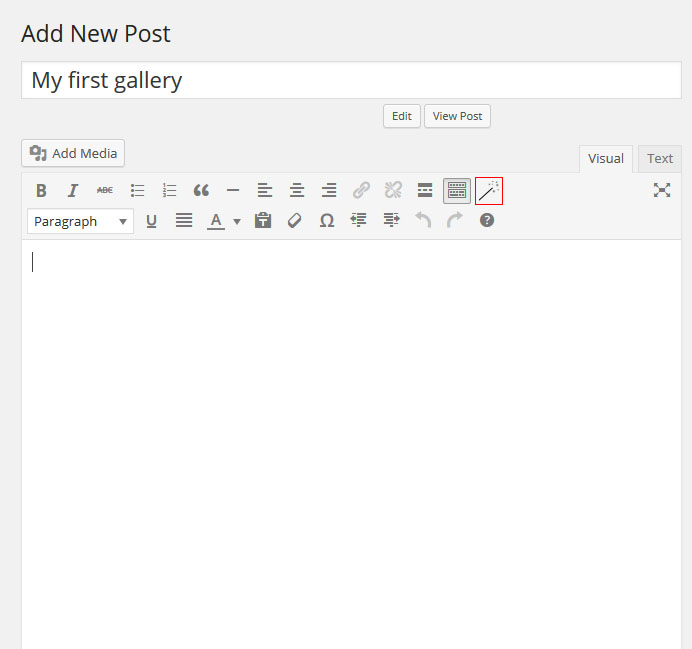
                              Add a new post or open the existing one and click the “Gallery Magic Shortcode” button (marked with a red square on the picture below).


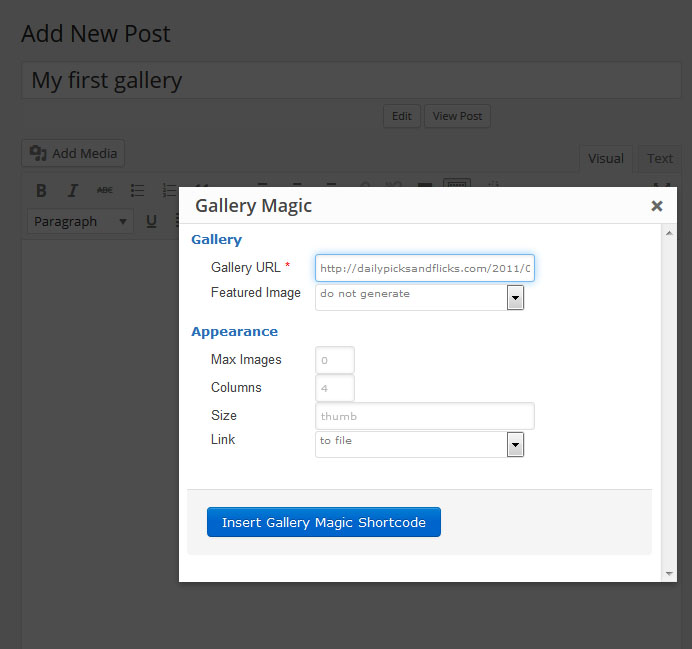
                              The “Gallery Magic” popup box will appear. Enter the URL of the HTML page which does contain a gallery you want to copy, then click the “Insert Gallery Magic Shortcode” button.


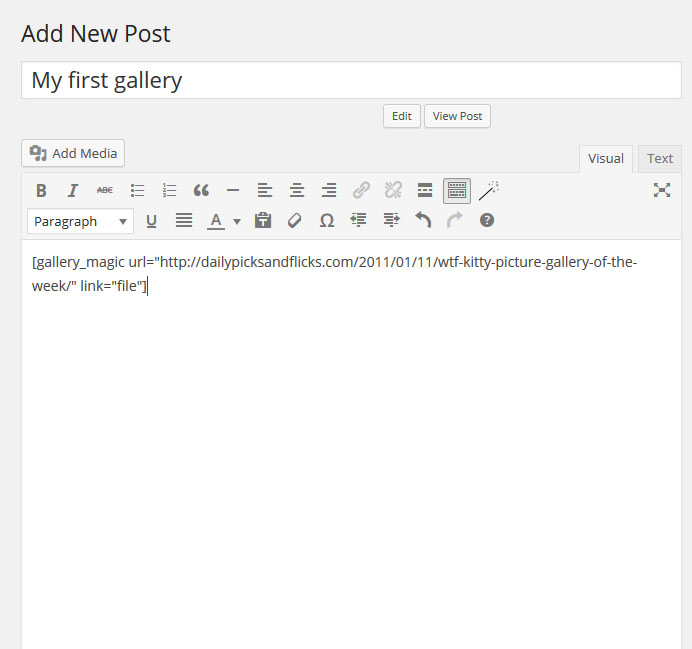
                              The gallery shortcode will be inserted into your post.


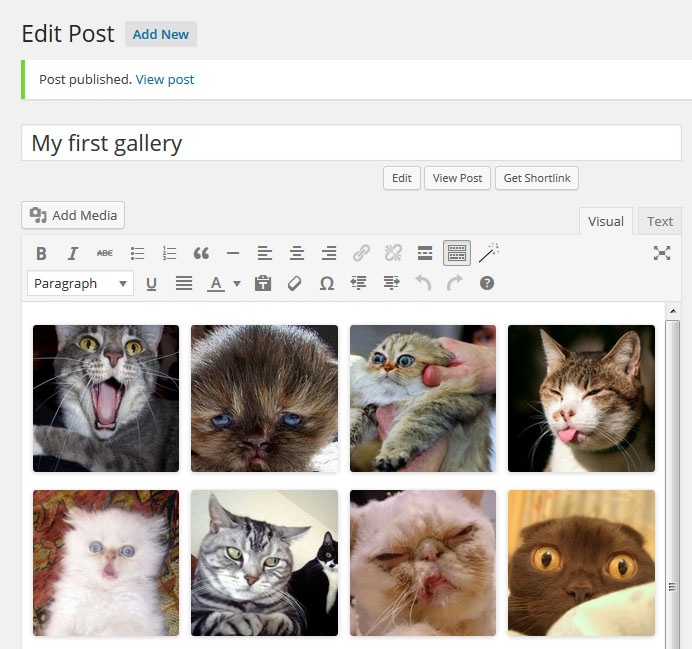
                              Now simple save or update the post and Vualá, your gallery is here:


                              Bunch Import Mode

                              This mode is very useful for importing a bunch of galleries from a plain text dump (e.g. CSV). Simple copy/paste your dump, set the formatting rules, adjust the post scheduler options and click the import button.


                              Last edited by just a punk; 10-10-2014, 09:47 AM.
                              Obey the Cowgod

                              Comment

                              • dichotomy
                                Confirmed User
                                • Jun 2003
                                • 135

                                #16
                                I use Responsive Image Gallery plugin (free) and WordPress Related Posts (also free) to get that tasty stuff after the post.

                                Looks like this in the post (responsive gallery):


                                WP related posts:


                                You can use shortcodes to put whatever galleries you like.

                                Nice plugin however, I am getting way better SE traffic when I just describe each pic in a simple tasty sentence like that:


                                Beats me from UI point, but I honestly don't see a big difference in the blog between normal links to jpeg and lightbox gallery plugin. IMHO it all (again) boils down to content.

                                Hope it helps!
                                Last edited by dichotomy; 10-10-2014, 04:30 PM.
                                #_
                                https://se.marketing/

                                Comment

                                • elmy
                                  Confirmed User
                                  • Jan 2005
                                  • 2337

                                  #17
                                  http://www.pluginmygallery.com/ working great
                                  The Most Effective Software For Porn Video Upload!
                                  Over 370 adult tube sites ready for upload! + Free Virtual Private Server!
                                  ★★ Tubes Booster - video cms for adult tube sites! ★★

                                  Comment

                                  • marlboroack
                                    So Fucking Banned
                                    • Jul 2010
                                    • 9327

                                    #18
                                    Originally posted by dichotomy
                                    I use Responsive Image Gallery plugin (free) and WordPress Related Posts (also free) to get that tasty stuff after the post.

                                    Looks like this in the post (responsive gallery):


                                    WP related posts:


                                    You can use shortcodes to put whatever galleries you like.

                                    Nice plugin however, I am getting way better SE traffic when I just describe each pic in a simple tasty sentence like that:


                                    Beats me from UI point, but I honestly don't see a big difference in the blog between normal links to jpeg and lightbox gallery plugin. IMHO it all (again) boils down to content.

                                    Hope it helps!
                                    Nice

                                    Comment

                                    Working...