
I have a 2010 made 13 Macbook PRO with 2GB RAM, anyone can tell if making it 8GB RAM will REALLY make a difference working with Photoshop. Just need to understand if that RAM upgrade will make it work an extra year or two without total hardware upgrade. Thanks.
-
Русня, идите нахуй! -
You're looking at $40 for 8GB DDR3 memory for that. Do you really have to ask if it's worth it? -
2 GB of RAM was slow in 2007.Vacares - Web Hosting, Domains, O365, Security & More - Paxum and BTC Accepted
Windows VPS now available
Great for TSS, Nifty Stats, remote work, virtual assistants, etc.
Click here for more details.Comment
-
So serious answer is Yes, for the Love of God, Upgrade!...Comment
-
-
Русня, идите нахуй!Comment
-
what about prices from non crapple store?Comment
-
I've got an Old Macbook 2009 model (non-pro) that I use for some things. It came with 2 gigs, I maxed it out to 6 gigs and it runs a lot quicker with Mountain Lion.Crazy fast VPS for $10 a month. Try with $20 free creditComment
-
Do you even need 8GB? It wont make any difference at all if you arent using much. You might have the same increase in performance with 4GB instead of 8, if any.Comment
-
I have the exact same April 2010 13" MBP (MacBook Pro 7.1) and I have 8GB RAM.
Yes it made a HUGE difference from the 4GB I had when I bought it. I am able to open many more browse tabs, and have many more programs running concurrently.
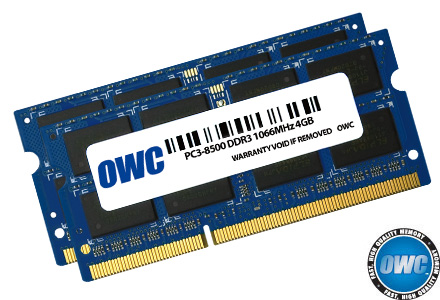
I am going to upgrade mine to 16GB in the next week or two, so if you are interested, I will sell you this 8GB kit (2 x 4GB) OWC RAM (about 8-9 months old) for $40 + whatever it costs me to send it to Poland via Canada Post (I have a commercial account, so you will get a discount on the shipping too)
Reply here or email me at eljefe |AT| a1websolutions |DOT| com Last edited by facialfreak; 02-24-2013, 04:14 PM.
Managed Shared Hosting starting at $4.99/mo
Managed VPS starting at $29.99/mo
Comment
-
Last edited by facialfreak; 02-24-2013, 04:11 PM.
Managed Shared Hosting starting at $4.99/mo
Managed VPS starting at $29.99/mo
Comment
-
Ram is so cheap nowadays and it definitely helps out. I just picked up an extra 16GB of DDR3-1600 for only $80 the other day. I love having several virtual machines, photoshop, firefox + lots of tabs, media player classic, and a game all running at the same time and not have to worry about my memory usage.Comment
-
yes it will speed things upNeed WebHosting ? Email me for some great deals [email protected]Comment
-
sorry not even ramComment
-

Ex GF Films | Grab Dollars
Up To 80% Rev-Share | 255 Day Cookie | Legal Content | Variety of Promo Tools | CCBill Program | GF Niche
james[at]grabdollars[dot]com | ICQ::611-99-zero-zero-20Comment
-
Cheaper, but will that be a good one?
http://www.transit.pl/apple/rozbudow...0mhz-ddr3.html ... Makes it $70 instead of $160... hm.Русня, идите нахуй!Comment
-
-
You'll see an extremely huge difference going from 2gb to 8gb of ram
I have no idea of what there is in terms of paging files and shit on macs but 2gb isn't enough for anyone
Is the mac os 32 or 64 bit though?Comment
-
If you want a performance boost, you will notice much more if you get an SSD rather than RAM.Comment
-
Model Name: MacBook Pro
Model Identifier: MacBookPro5,5
Processor Name: Intel Core 2 Duo
Processor Speed: 2.26 GHz
Number Of Processors: 1
Total Number Of Cores: 2
L2 Cache: 3 MB
Memory: 2 GB
Bus Speed: 1.07 GHz
Boot ROM Version: MBP55.00AC.B03
SMC Version (system): 1.47f2
Serial Number (system): W8938L0866D
Hardware UUID: 90721168-5C9D-512A-83AA-2DAD47D7FF07
Sudden Motion Sensor:
State: EnabledРусня, идите нахуй!Comment
-
SSDs are a huge improvement, too, he's right
Go for the ram AND the SSD
Both are cheap
Of course, by the time you spend $200 on a computer with a core2 cpu, you may as well just go and get a better computer- but- I have heard that macs cost a billion dollars, so maybe notComment
-
Ex GF Films | Grab Dollars
Up To 80% Rev-Share | 255 Day Cookie | Legal Content | Variety of Promo Tools | CCBill Program | GF Niche
james[at]grabdollars[dot]com | ICQ::611-99-zero-zero-20Comment
-
Okay, I have found that prices off the macstore can be much better, now, how do i know if my current RAM is 1067 would it be ok to buy 1066, 1333 or even 1600 RAM?Русня, идите нахуй!Comment
-
1067?
I'm pretty sure it's all backwards compatible if you buy the right shit.. you know, the right is it DDR2 or DDR3 or DDR and the right # of pins
Try this
http://www.crucial.com/store/drammemory.aspx
Not sure about macs but on PCs it'll just run at the speed of the slowest stick
So if you have two 1600 and two 1333 they all run at 1333Comment
-
You spent all that money at the time on a mac and $160 was really a concern? :o I ordered 8gb of ram for mine at the same time as I ordered it, Ram turned up before the laptop.Comment
-
its a big diff, but the best thing that you can do its to buy a ssd disk and replace the old oneBeautiful And Usable Web Design Creations For The Adult Industry Since 2003
I'm Yuu, Designer and Content Producer
Paysites - Affiliate Programs - Dating & Cam Sites - Mainstream Projects - Tube Sites - Banners - Wordpress Themes - NATs integration - Landing Pages
Check my Portfolio and Content Production OffersComment
-
Always upgrade! It makes all the difference you could hope for.Bright Desire - Smart, sensual porn.
[email protected] Skype - SophieDelancey Twitter - @SophieDelancey ICQ - 602670915Comment
-
Русня, идите нахуй!Comment
-
The RAM for your 2.26 C2D is the same as mine ... I just checked on www.macsales.com
8.0GB (4.0GB + 4.0GB) PC8500 DDR3 SO DIMM 204pin 1066MHZ
Offer still stands if interested?
Managed Shared Hosting starting at $4.99/mo
Managed VPS starting at $29.99/mo
Comment
-
Why would an SSD cost $500?
If you mean because you'd have to buy a high capacity one because you only have one drive bay, sometimes there is an extra slot called micro something where you can add one of those "ssd hard drive card things" which is NOT the technical term for it
Also- yeah, crucial scanner should tell you what you can max out at. Or look for your specific model # specifications in googleComment
-
to check on your macbook pro ram based on the model, simply go to the "apple logo" in the top of your screen, check "about this mac", then goto "more info", "memory"
You have to put the same speed - if you go higher it may work or it may not but regardless of speed, the processor will slow the speed down to whatever it is (1067MHz) so it serves no purpose.ICQ 115433750Comment



Comment