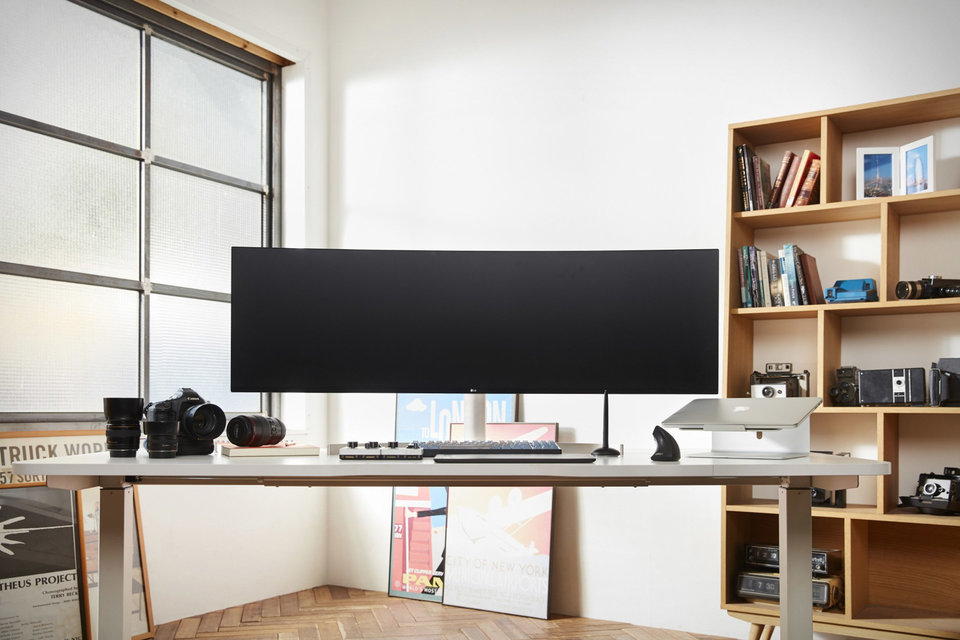
49" Wide monitor for your desk !!!!!!

Collapse
X
 
  • Time
  • Show
Clear All
new posts
  • Busty2
    Member since 1999
    • Dec 2007
    • 7200

    #1

    49" Wide monitor for your desk !!!!!!

    I'm not able to find this on the LG's site but it sure looks cool.

    LG ULTRAWIDE MONITOR
    Stretching 49 inches across, the LG 49WL95 UltraWide Monitor is ideal for those who spend their days shuffling multiple windows. It has a resolution of 5120 x 1440 — the equivalent of two 27-inch QHD screens stuck together — and a PPI of 108, making text crisp and photographs pop. Its USB-C connection can provide power to laptops, a Picture by Picture mode lets content from multiple sources appear side-by-side, and support for HDR 10 and 4K video make the slightly curved screen a great way to take in immersive content.

    https://uncrate.com/lg-ultrawide-monitor/
  • CurrentlySober
    Too lazy to wipe my ass
    • Aug 2002
    • 38978

    #2
    i cunt a4da 49" Wide monitor for my desk !!!!!!

    Nor a desk either...
    ️ ️

    Comment

    • MFCT
      Confirmed User
      • Jan 2015
      • 1489

      #3
      I like it!

      It may be even better if it were semi-wrap-around, like a big U. Or maybe even like a big O helmet-type thing that you can be lowered over your head after you sit down at your desk.

      But like CS, I can dream.

      Keeping you abreast of the teens that get undressed.
      Girls By Location - Couples By Location - Guys By Location - Trans By Location

      Comment

      • CurrentlySober
        Too lazy to wipe my ass
        • Aug 2002
        • 38978

        #4
        ️ ️

        Comment

        • celandina
          Too lazy to set a custom title
          • Jun 2006
          • 11764

          #5
          Originally posted by Busty2
          I'm not able to find this on the LG's site but it sure looks cool.

          LG ULTRAWIDE MONITOR
          Stretching 49 inches across, the LG 49WL95 UltraWide Monitor is ideal for those who spend their days shuffling multiple windows. It has a resolution of 5120 x 1440 — the equivalent of two 27-inch QHD screens stuck together — and a PPI of 108, making text crisp and photographs pop. Its USB-C connection can provide power to laptops, a Picture by Picture mode lets content from multiple sources appear side-by-side, and support for HDR 10 and 4K video make the slightly curved screen a great way to take in immersive content.

          https://uncrate.com/lg-ultrawide-monitor/

          I will wait for the 79 inch monitor @ 8K rez., or maybe I should choose a cheaper option and buy a new pair of glasses ;)

          Comment

          • 2MuchMark
            Mark of 2Much.net
            • Aug 2004
            • 51009

            #6
            I just ordered the 49" Dell Ultrawide

            https://www.dell.com/en-ca/shop/dell...or-accessories

            But according to the PO I wouldn't get it until February. Grr.

            Comment

            • Constant Phil
              Confirmed User
              • Mar 2012
              • 270

              #7
              I scooped up a 34" curved alienware monitor from amazon. Seems to be the largest curved monitor that still keeps a decent horizontal resolution. The larger ones look weird

              [email protected]

              Comment

              • freecartoonporn
                Confirmed User
                • Jan 2012
                • 7683

                #8
                i am still good on 18.5 inch LG monitor
                idk with monitor that large you have to constantly move your head sideways.,
                SSD Cloud Server, VPS Server, Simple Cloud Hosting | DigitalOcean

                Comment

                • Rochard
                  Jägermeister Test Pilot
                  • Dec 2001
                  • 75761

                  #9
                  I run three monitors... I like having one monitor dedicated to each task. I've been doing this for years, back in the day when you had to have multiple graphics cards to do it...

                  Herschel Savage
                  Brooklyn, NY

                  Comment

                  • pimpmaster9000
                    Too lazy to set a custom title
                    • Dec 2011
                    • 26730

                    #10
                    I am tempted but I also do not need it...
                    Report a suspicious cracker: Click Here

                    Comment

                    • 2MuchMark
                      Mark of 2Much.net
                      • Aug 2004
                      • 51009

                      #11
                      remember these?

                      Comment

                      • JFK
                        FUBAR the ORIGINATOR
                        • Jan 2002
                        • 67369

                        #12
                        Originally posted by 2MuchMark
                        I just ordered the 49" Dell Ultrawide

                        https://www.dell.com/en-ca/shop/dell...or-accessories

                        But according to the PO I wouldn't get it until February. Grr.
                        congrats!

                        FUBAR Webmasters - The FUBAR Times - FUBAR Webmasters Mobile - FUBARTV.XXX
                        For promo opps contact jfk at fubarwebmasters dot com

                        Comment

                        • robwod
                          Confirmed User
                          • Nov 2005
                          • 2540

                          #13
                          Personally I prefer multi-monitor setups as, if one monitor goes, you can swap it out easily enough.

                          This is a great place to go: Zenview multimonitor setups.
                          https://www.digitaltigers.com/zenview.asp

                          In particular:
                          https://www.digitaltigers.com/zenview-apex22h.asp <-- smaller size.
                          https://www.digitaltigers.com/zenview-apex27.asp <-- nice setup with the 27" monitors.

                          Now, anyone who has dual monitors already knows that productivity increases by at least double over that of a single monitor. Triple monitors, in my opinion, further increased my productivity. But I really like the 4th monitor because you can have stuff like notes, skype chats, slack chats, and other extranneous items opened in the 4th/top monitor while your productivity takes place across the three mains.
                          NSFW

                          Comment

                          • 2MuchMark
                            Mark of 2Much.net
                            • Aug 2004
                            • 51009

                            #14
                            Originally posted by robwod
                            Personally I prefer multi-monitor setups as, if one monitor goes, you can swap it out easily enough.

                            This is a great place to go: Zenview multimonitor setups.
                            https://www.digitaltigers.com/zenview.asp

                            In particular:
                            https://www.digitaltigers.com/zenview-apex22h.asp <-- smaller size.
                            https://www.digitaltigers.com/zenview-apex27.asp <-- nice setup with the 27" monitors.

                            Now, anyone who has dual monitors already knows that productivity increases by at least double over that of a single monitor. Triple monitors, in my opinion, further increased my productivity. But I really like the 4th monitor because you can have stuff like notes, skype chats, slack chats, and other extranneous items opened in the 4th/top monitor while your productivity takes place across the three mains.
                            I have been using a dual monitor setup since it was first possible in Windows. Love it.

                            I tried 3 monitors and even 4 at 1 time, but I didn't like it. Partly because my productivity seemed to go down, not up, and partly because of the mess it made of my desk.

                            My current setup is 2 x iMac 27's connected together to form a single desktop. It works well, but one machine is mostly under utilized, and in the summer my home office gets pretty hot even with air conditioning.

                            As the machines are 9 and 10 years old now, I've decided its time to replace them with the new iMac Mini 2018, and a 49" Monitor.

                            I was looking at the Ultra wides for a while, but none of them supported 1440 vertical resolution which is the vertical res I'm most comfortable at, until just recently.

                            In 1 way I want dual monitors. It's cheaper and I have the flexibility of moving one of them to another machine if I need to. Then again, using a single monitor means less wires, less clutter, and the option to connect multiple computers to it, and even run 2 computers side-by-side, and built-in KVM Controls too.

                            I'm looking forward to the new setup!

                            Comment

                            • robwod
                              Confirmed User
                              • Nov 2005
                              • 2540

                              #15
                              Mark: understood. I have so many things going at any given time to cross reference (navicat for databases, sftp client, multiple instances of ssh, batches, code, spreadsheets, yada yada yada). I used to have to shuffle skype windows and other business related correspondence, like email, back and forth as needed, or monimized. Now i just leave all of those types of apps opened on the upper 4th monitor and never need to close, minimize, or hardly even need to ever resize anything I use during the day.

                              But I understand what you mean about productivity. Each person's setup has to work for the tasks they are doing, and what makes it comfortable to work with.

                              One HUGE downside with a multi-monitor environment is that if one goes bad a year later, a replacement monitor -- even the same model, if available -- often requires a boatload of calibration / tweaking to make it look the same as the others.

                              Regardless, congrats on the purchase. I'll be looking forward to hearing how you like a single large monitor, and that model in particular.
                              NSFW

                              Comment

                              • Tim
                                AffiliateManager for Hire
                                • Feb 2002
                                • 19199

                                #16
                                Would be great for music production
                                🍑🍆 Sex Vitamins
                                🍑 𓂸
                                This sig for sale!

                                Comment

                                • RyuLion
                                  • Mar 2003
                                  • 32371

                                  #17
                                  I don't need that.

                                  Adult Biz Consultant A tech head since 1995
                                  Affiliate Support: Chaturbate | CCBill Live

                                  Comment

                                  • Mr Pheer
                                    So Fucking Banned
                                    • Dec 2002
                                    • 22082

                                    #18
                                    I use 4 screens plus a VR headset, which counts as a 5th screen.

                                    Comment

                                    • SBJ
                                      So Fucking Fabulous
                                      • Apr 2003
                                      • 11377

                                      #19
                                      looks badass but I'll stick with my two 21.5" lcds that I picked up a few mos ago.

                                      Comment

                                      • 2MuchMark
                                        Mark of 2Much.net
                                        • Aug 2004
                                        • 51009

                                        #20
                                        Originally posted by robwod
                                        Mark: understood. I have so many things going at any given time to cross reference (navicat for databases, sftp client, multiple instances of ssh, batches, code, spreadsheets, yada yada yada). I used to have to shuffle skype windows and other business related correspondence, like email, back and forth as needed, or monimized. Now i just leave all of those types of apps opened on the upper 4th monitor and never need to close, minimize, or hardly even need to ever resize anything I use during the day.
                                        When I am at my busiest I have a bunch of apps running too and its slow as hell, even on 2 monitors, to move them around and bring whatever I want to bring to the top. It's been a while since I've used 3 monitors but maybe that would have helped.


                                        Originally posted by robwod
                                        But I understand what you mean about productivity. Each person's setup has to work for the tasks they are doing, and what makes it comfortable to work with.
                                        Bingo. My spouse works from home too and she had a dozen things running at once, all on her 16" Laptop. I begged her to get a dual large monitor desktop setup but she wasn't interested, so I surprised her with 2 x 27" monitors. At first she was mad because it made her office looked "Too Monitor-ee" (!), but after 60 minutes she was hooked. She now wants a 3rd one too.


                                        Originally posted by robwod
                                        One HUGE downside with a multi-monitor environment is that if one goes bad a year later, a replacement monitor -- even the same model, if available -- often requires a boatload of calibration / tweaking to make it look the same as the others.
                                        Yup. But that's not so bad though.

                                        Originally posted by robwod
                                        Regardless, congrats on the purchase. I'll be looking forward to hearing how you like a single large monitor, and that model in particular.
                                        Just found out yesterday that it has been shipped and should arrive today. Woo Hoo, but this sucks because I ordered the Mac Mini and it won't arrive for another 2 weeks. I can connect it to my Macbook air but it won't support the monitor in full resolution I don't think. I could connect it to my PC which will support it, but I'm more of a Mac person and don't want to switch. So probably I'll just leave it in the box until the 'mini arrives.

                                        Comment

                                        • NatalieK
                                          Natalie K
                                          • Apr 2010
                                          • 19850

                                          #21
                                          only equivalent to 2 27 inch screens... not too impressive! Maybe 2x 37inch, at least then the height of the screen would be worth while. Otherwise, other than the length, the image height´s not much more than a laptop
                                          My official site / Custom vids / Make money links / First time girls
                                          Email: [email protected] - "Converting traffic into income since 2005"

                                          Comment

                                          • 2MuchMark
                                            Mark of 2Much.net
                                            • Aug 2004
                                            • 51009

                                            #22
                                            Originally posted by GspotProductions
                                            only equivalent to 2 27 inch screens... not too impressive! Maybe 2x 37inch, at least then the height of the screen would be worth while. Otherwise, other than the length, the image height´s not much more than a laptop
                                            I was checking this carefully. The 49" Ultra wides are the same as 2 x 27" Monitors. The 34" Monitors were too small for me.

                                            Anyway, update! I received it today. As I knew, it would not work with my 2013 Macbook air because I need a Display Port to Mini DisplayPort cable and I don't have one. I tried my Displayport to HDMI cable but HDMI isn't good enough to get the resolution needed, so it sucked.

                                            My Mac Mini with USB-C is 2 weeks away still.

                                            But anyway, I connected it to my 2016 PC which has an NVidia card (I forget the model #) via Display Port and it worked well. Auto detect the res and screen size, etc. I played with it for about half an hour. Love it. Can't wait to make it my new desktop.

                                            I was worried that despite it being 49", it still looked small. But once I had it on my desk and in front of my dual 27's, I realized that it's actually the same size. The reason it seems smaller is because there is almost no bezel on the sides, top or bottom. My iMacs have a 1 inch bezel on the top and sides, and about 3 inches on the bottom. My Macs seem like together they make a bigger screen, but in reality its the same size.

                                            Comment

                                            • LitAsFuck
                                              Confirmed User
                                              • Apr 2018
                                              • 139

                                              #23
                                              i can't imagine working on this one, it is too big for me

                                              Comment

                                              Working...