How do you do this to photos in photoshop?

Collapse
X
 
  • Time
  • Show
Clear All
new posts
  • tical
    Confirmed User
    • Feb 2002
    • 6504

    #1

    How do you do this to photos in photoshop?

    How do you achieve this photo retouching effect in photoshop? I'm not sure what it's called, but it makes the pictures really pop...

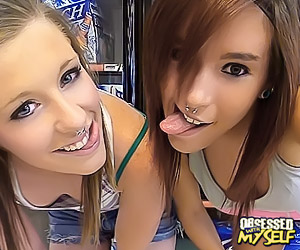
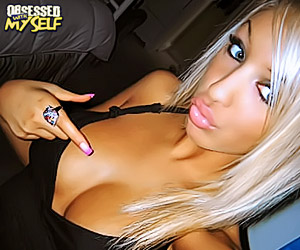
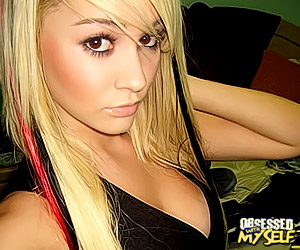


    taken from: http://www.obsessedwithmyself.com/t1/
    112.020.756
  • anexsia
    Confirmed User
    • May 2010
    • 5735

    #2
    I personally think it makes the pictures look retarded but to each his own...I think if it was done a little bit it would be great but some exgf sites go crazzzzzy with it!

    Comment

    • Lace
      Too lazy to set a custom title
      • Mar 2004
      • 16116

      #3
      https://www.google.com/search?q=phot...oshop+tutorial
      Your Paysite Partner
      Strength In Numbers!
      StickyDollars | RadicalCash | KennysPennies | HomegrownCash

      Comment

      • Mutt
        Too lazy to set a custom title
        • Sep 2002
        • 34431

        #4
        Portraiture plug-in for Photoshop will get you most of the way there, some people just us that, it's pretty good - dodge and burn tool will exaggerate highlights and shadows, whites of the eyes are whitened with the dodge tool.
        I moved my sites to Vacares Hosting. I've saved money, my hair is thicker, lost some weight too! Thanks Sly!

        Comment

        • tical
          Confirmed User
          • Feb 2002
          • 6504

          #5
          Thanks Mutt!
          112.020.756

          Comment

          • Mutt
            Too lazy to set a custom title
            • Sep 2002
            • 34431

            #6
            sent you a message on icq
            I moved my sites to Vacares Hosting. I've saved money, my hair is thicker, lost some weight too! Thanks Sly!

            Comment

            • seeandsee
              Check SIG!
              • Mar 2006
              • 50945

              #7
              dating ads are in love with such pics
              BUY MY SIG - 50$/Year

              Contact here

              Comment

              • candyflip
                Carpe Visio
                • Jul 2002
                • 43069

                #8
                There's probably an App for that.

                Spend you some brain.
                Email Me

                Comment

                • loreen
                  myadultdesign.com
                  • May 2004
                  • 12558

                  #9
                  Originally posted by Mutt
                  Portraiture plug-in for Photoshop will get you most of the way there
                  Portraiture is much more subtle and nice. The examples are straight up damaged photos

                  I think there is a program that automatically does them this way. Retarded - like anexsia said
                  Banners, logos, headers, peels, FHGs, ads, paysites, photo retouching etc: my adult design portfolio
                  My logo portfolio: PornLogos.com

                  Comment

                  • Redrob
                    Confirmed User
                    • Oct 2004
                    • 4791

                    #10
                    A gaussian blur can get rid of stretch marks and smooth skin if followed with a sharpen image to restore edges.

                    I'd use a blur tool or clone tool in close for anything major.

                    Comment

                    • AAB
                      Confirmed User
                      • Apr 2009
                      • 874

                      #11
                      Plastic look is definitely retarded.

                      Comment

                      • Sid70
                        Downshifter
                        • Dec 2002
                        • 16413

                        #12
                        NeatImage.
                        All above answers are retarded.
                        Last edited by Sid70; 12-26-2011, 01:13 AM.
                        Русня, идите нахуй!

                        Comment

                        • Farang
                          one sick puppy
                          • Oct 2004
                          • 11711

                          #13
                          http://gfy.com/showpost.php?p=10265784&postcount=15
                          fbm

                          Comment

                          • Mutt
                            Too lazy to set a custom title
                            • Sep 2002
                            • 34431

                            #14
                            here's a progression i just did in literally 2 minutes to a Natasha Belle thumb.

                            first is the original photo, ryan from solorevenue is a very good editor/retoucher

                            second is the original photo with a medium intensity setting on Portraiture plugin

                            third is the Portraitured photo duplicated and contrast and saturation boosted in Photoshop

                            fourth is the third photo duplicated and using the dodge tool to increase highlights, most on her hair

                            I moved my sites to Vacares Hosting. I've saved money, my hair is thicker, lost some weight too! Thanks Sly!

                            Comment

                            • Grapesoda
                              So Fucking Banned
                              • Jul 2003
                              • 46234

                              #15
                              Originally posted by tical
                              How do you achieve this photo retouching effect in photoshop? I'm not sure what it's called, but it makes the pictures really pop...


                              taken from: http://www.obsessedwithmyself.com/t1/

                              http://www.imagenomic.com/pt.aspx

                              Comment

                              • Zoxxa
                                Confirmed User
                                • Feb 2011
                                • 1026

                                #16
                                I tried for a long time to create those thumbs years ago in photoshop, finally I thought outside the box and tried using different software. I came to find out the new paint shop pro versions destroy photoshop in photo retouching and was able to achieve the thumbs I wanted in a matter of an hour or so of playing with it. Then I created batch runs and applied it to hundreds of pics at once.
                                Last edited by Zoxxa; 12-26-2011, 04:24 AM.
                                [email protected]
                                ICQ: 269486444
                                ZoxEmbedTube - Build unlimited "fake" tubes with this easy 100% unencoded CMS!

                                Comment

                                • CaptainHowdy
                                  Too lazy to set a custom title
                                  • Dec 2004
                                  • 94034

                                  #17
                                  Originally posted by Mutt

                                  Comment

                                  • GARY LEE
                                    Confirmed User
                                    • Aug 2007
                                    • 600

                                    #18
                                    Different but not as bad as some of you make it sound; to each his own.
                                    amateur porn videos
                                    lipstick lesbians

                                    Comment

                                    • Sid70
                                      Downshifter
                                      • Dec 2002
                                      • 16413

                                      #19
                                      Jezuz, I'm telling you it's NetImage - I did a ton of those!
                                      Русня, идите нахуй!

                                      Comment

                                      • Stephen
                                        Consigliere
                                        • Feb 2003
                                        • 1771

                                        #20
                                        Originally posted by Redrob
                                        A gaussian blur can get rid of stretch marks and smooth skin if followed with a sharpen image to restore edges.
                                        I like to select large areas of skin in Photoshop, contract 2px and feather the selection 2px - 4px, before hitting the Gaussian blur (this helps maintain distinct edges). Follow up with an unsharp mask at 50%, then use manual sharpening on specific highlights, such as eyes, piercings, etc.

                                        It's easy to get the pic to pop, but still seem more "natural" in doing so...

                                        There's many ways around the problem
                                        Last edited by Stephen; 12-26-2011, 06:09 AM.

                                        Comment

                                        • Sid70
                                          Downshifter
                                          • Dec 2002
                                          • 16413

                                          #21
                                          Originally posted by Stephen
                                          I like to select large areas of skin in Photoshop, contract 2px and feather the selection 2px - 4px, before hitting the Gaussian blur (this helps maintain distinct edges). Follow up with an unsharp mask at 50%, then use manual sharpening on specific highlights, such as eyes, piercings, etc.

                                          It's easy to get the pic to pop, but still seem more "natural" in doing so...

                                          There's many ways around the problem

                                          This is: Sharpening, Vibrance and NeatImage. Period.
                                          Русня, идите нахуй!

                                          Comment

                                          • Dirty F
                                            Too lazy to set a custom title
                                            • Jul 2001
                                            • 59204

                                            #22
                                            Originally posted by tical
                                            How do you achieve this photo retouching effect in photoshop? I'm not sure what it's called, but it makes the pictures really pop...


                                            taken from: http://www.obsessedwithmyself.com/t1/
                                            I actually never understood why people do this. It looks really bad.

                                            Comment

                                            • Mutt
                                              Too lazy to set a custom title
                                              • Sep 2002
                                              • 34431

                                              #23
                                              Originally posted by Sid70
                                              This is: Sharpening, Vibrance and NeatImage. Period.
                                              ok mr expert and anybody else who wants to try - here are 4 perfect candidates to show what NeatImage or your own techniques can do to get that effect all the ex-gf sites use on their tours.


                                              I moved my sites to Vacares Hosting. I've saved money, my hair is thicker, lost some weight too! Thanks Sly!

                                              Comment

                                              • AaronM
                                                GFY Royality ;)
                                                • Oct 2001
                                                • 46917

                                                #24
                                                Originally posted by Mutt
                                                ok mr expert and anybody else who wants to try - here are 4 perfect candidates to show what NeatImage or your own techniques can do to get that effect all the ex-gf sites use on their tours.


                                                Looking forward to seeing the results....

                                                Comment

                                                • Pseudonymous
                                                  Photographer/Owner
                                                  • Apr 2006
                                                  • 2661

                                                  #25


                                                  Saturation/Vibrance/Smart Blur or Portraiture/Exposure or Brightness/Contast. Simple

                                                  Can't do it with all photos because ones that use more natural light have more noise and shadows, etc - Obviously alot of these exgf photos that are used on tours are selected from some of the most clickable photos. All photos can't turn out looking as good, depends how the lighting and shadows are to begin with. As you can see, i started off with a photo easier to use than the ones shown above. Mainly because the ones mentioned have a lack of light hitting her face

                                                  I was going to respond when I saw the thread was created but I was heading to bed
                                                  Last edited by Pseudonymous; 12-26-2011, 08:54 AM.
                                                  Previous owner of SoloRevenue
                                                  Previous product manager @ Modelcentro.com/MCProfits.com, IsMyGirl.com, SMRevenue.com

                                                  Comment

                                                  • 2MuchMark
                                                    Mark of 2Much.net
                                                    • Aug 2004
                                                    • 50921

                                                    #26
                                                    A photoshop filter does not a photoshop artist make. End user are very aware of photo retouching and applying a blur filter takes away from the "realness" of the subject for then.

                                                    To keep pictures looking REAL in photoshop, use the tools only to fix glaring mistakes in a photo. Clone-out things you don't want, etc. If your model is showing a little extra chub, liquify it out carefully.

                                                    To make pictures pop, increase the saturday and / or vibrance, but not too much. Subtle use of this and all other tools go a long way. Lately my favourite thing to do has been to de-saturate the color in images and then cool off the color temp even more for no reason except that I like the final result it brings to pro shoots.

                                                    Comment

                                                    • Pseudonymous
                                                      Photographer/Owner
                                                      • Apr 2006
                                                      • 2661

                                                      #27
                                                      Thats not always the case Mark, if we're talking exgf sites, that kind of thing works, especially for promotion. Theres a reason most of them do it. My ex gf network was a few hundred k a day before I sold it off last year and got out of that disgusting niche. So I can definitely say from experience that it works

                                                      Though doing that with photos in most other niches and with actual non promotional photos, thats just insane.
                                                      Last edited by Pseudonymous; 12-26-2011, 09:13 AM.
                                                      Previous owner of SoloRevenue
                                                      Previous product manager @ Modelcentro.com/MCProfits.com, IsMyGirl.com, SMRevenue.com

                                                      Comment

                                                      • Sid70
                                                        Downshifter
                                                        • Dec 2002
                                                        • 16413

                                                        #28
                                                        Originally posted by Pseudonymous


                                                        Saturation/Vibrance/Smart Blur or Portraiture/Exposure or Brightness/Contast. Simple

                                                        Can't do it with all photos because ones that use more natural light have more noise and shadows, etc - Obviously alot of these exgf photos that are used on tours are selected from some of the most clickable photos. All photos can't turn out looking as good, depends how the lighting and shadows are to begin with. As you can see, i started off with a photo easier to use than the ones shown above. Mainly because the ones mentioned have a lack of light hitting her face

                                                        I was going to respond when I saw the thread was created but I was heading to bed
                                                        Take a look:


                                                        NetImage is a must.
                                                        Русня, идите нахуй!

                                                        Comment

                                                        • Pseudonymous
                                                          Photographer/Owner
                                                          • Apr 2006
                                                          • 2661

                                                          #29
                                                          Originally posted by Sid70
                                                          Take a look:


                                                          NetImage is a must.
                                                          All that is, is my photo with some HDR toning within Photoshop. If you want it extra fake looking and even more pop. I guess you can use that.

                                                          And I don't think the photos in the original post are that heavily done
                                                          Last edited by Pseudonymous; 12-26-2011, 10:00 AM.
                                                          Previous owner of SoloRevenue
                                                          Previous product manager @ Modelcentro.com/MCProfits.com, IsMyGirl.com, SMRevenue.com

                                                          Comment

                                                          • borked
                                                            Totally Borked
                                                            • Feb 2005
                                                            • 6284

                                                            #30
                                                            PortraitProfessional is pretty damn hot....from simply smoothing over blemishes to pasty doll look.

                                                            For coding work - hit me up on andy // borkedcoder // com
                                                            (consider figuring out the email as test #1)


                                                            All models are wrong, but some are useful. George E.P. Box. p202

                                                            Comment

                                                            • Sid70
                                                              Downshifter
                                                              • Dec 2002
                                                              • 16413

                                                              #31
                                                              Originally posted by Pseudonymous
                                                              All that is, is my photo with some HDR toning within Photoshop. If you want it extra fake looking and even more pop. I guess you can use that.

                                                              And I don't think the photos in the original post are that heavily done
                                                              Less vivid beatch - but I assure you they used NeatImage.

                                                              Русня, идите нахуй!

                                                              Comment

                                                              • Pseudonymous
                                                                Photographer/Owner
                                                                • Apr 2006
                                                                • 2661

                                                                #32
                                                                Possibly but I can easily match any photo by using photoshop without a plugin. And its not really all that more time consuming


                                                                While im sure you adjusted something in NeatImage, i just adjusted saturation and a few HDR toning controls and changed my photo to match yours ;)
                                                                Last edited by Pseudonymous; 12-26-2011, 12:45 PM.
                                                                Previous owner of SoloRevenue
                                                                Previous product manager @ Modelcentro.com/MCProfits.com, IsMyGirl.com, SMRevenue.com

                                                                Comment

                                                                • Pseudonymous
                                                                  Photographer/Owner
                                                                  • Apr 2006
                                                                  • 2661

                                                                  #33
                                                                  Originally posted by Sid70
                                                                  Less vivid beatch - but I assure you they used NeatImage.


                                                                  Just doing this out of my own curiousity to see if that plugin offers something else I cant match with simple adjustments

                                                                  Edit - Yep all the adjustments that are being made with your plugin are inside the HDR toning section of Photoshop
                                                                  Last edited by Pseudonymous; 12-26-2011, 01:04 PM.
                                                                  Previous owner of SoloRevenue
                                                                  Previous product manager @ Modelcentro.com/MCProfits.com, IsMyGirl.com, SMRevenue.com

                                                                  Comment

                                                                  • Sid70
                                                                    Downshifter
                                                                    • Dec 2002
                                                                    • 16413

                                                                    #34
                                                                    I cant force you to believe in case you are unable to see the difference in those last two images.
                                                                    Русня, идите нахуй!

                                                                    Comment

                                                                    • Pseudonymous
                                                                      Photographer/Owner
                                                                      • Apr 2006
                                                                      • 2661

                                                                      #35
                                                                      Originally posted by Sid70
                                                                      I cant force you to believe in case you are unable to see the difference in those last two images.
                                                                      I wasn't showing you those images and saying theyre identical. I was showing you those images to prove myself that if i sat here long enough, by adjusting the controls, i could match it. I wasn't trying to prove you wrong. I was simply trying to find out for myself and others who might be searching keywords in this thread in the future wondering if they need a plugin to make these types of images. And im suggesting they do not. Plugins for photoshop are usually made to make things a little more simpler for people who dont know how to work photoshop and sometimes quicker. For this effect, I don't think it's hard to manually achieve so I would personally just do it through photoshop and use the batch feature to do multiple photos

                                                                      The strength of hdr toning /detail is the only difference between our photos. I would show you an identical image but to match the exact percent of each control by just looking at a photo is hard. If i made a photo, you couldn't match it with that plugin either. The fact is, i was close and only by small adjustments, i would have been spot on
                                                                      Last edited by Pseudonymous; 12-26-2011, 01:18 PM.
                                                                      Previous owner of SoloRevenue
                                                                      Previous product manager @ Modelcentro.com/MCProfits.com, IsMyGirl.com, SMRevenue.com

                                                                      Comment

                                                                      • danevans
                                                                        Confirmed User
                                                                        • Jun 2001
                                                                        • 1295

                                                                        #36
                                                                        of course PS is better for when you want to be picky about a single pic (and portraiture is great in high-res pics and real fashion portrait retouching), but Sid70 has his point - when you want to batch process a huge number of images (lets say you want to fix hundreds of thousands of images for a tube site, tgp, paysite tour or members area) NeatImage gives good results.. (I think that guys at maniacpass.com use that for most of their thumbs across all sites, and there's a world of difference between auto-generated screenshots and thumbs you can see after neatimage intervention)
                                                                        Custom adult games / apps for your paysites.
                                                                        webmaster at multimoodia.net
                                                                        icq35291012

                                                                        Comment

                                                                        • SomeCreep
                                                                          :glugglug
                                                                          • Mar 2003
                                                                          • 26118

                                                                          #37
                                                                          Simple, turn up the brightness and contrast. Sharpen.

                                                                          Webair Hosting

                                                                          I use and recommend Webair for hosting.

                                                                          Comment

                                                                          • Mutt
                                                                            Too lazy to set a custom title
                                                                            • Sep 2002
                                                                            • 34431

                                                                            #38
                                                                            I moved my sites to Vacares Hosting. I've saved money, my hair is thicker, lost some weight too! Thanks Sly!

                                                                            Comment

                                                                            • ArsewithClass
                                                                              So Fucking Banned
                                                                              • Mar 2007
                                                                              • 7957

                                                                              #39
                                                                              Originally posted by Pseudonymous


                                                                              Just doing this out of my own curiousity to see if that plugin offers something else I cant match with simple adjustments

                                                                              Edit - Yep all the adjustments that are being made with your plugin are inside the HDR toning section of Photoshop
                                                                              I prefer the vivid pink on the other image to this one

                                                                              Comment

                                                                              • Pseudonymous
                                                                                Photographer/Owner
                                                                                • Apr 2006
                                                                                • 2661

                                                                                #40
                                                                                Originally posted by ArsewithClass
                                                                                I prefer the vivid pink on the other image to this one
                                                                                I do also, I just dont have the time to sit here and adjust settings until I match that exact settings of that photo. It's just HDR toning though. Which can be adjusted in photoshop
                                                                                Previous owner of SoloRevenue
                                                                                Previous product manager @ Modelcentro.com/MCProfits.com, IsMyGirl.com, SMRevenue.com

                                                                                Comment

                                                                                • Mutt
                                                                                  Too lazy to set a custom title
                                                                                  • Sep 2002
                                                                                  • 34431

                                                                                  #41
                                                                                  Originally posted by Sid70
                                                                                  Take a look:


                                                                                  NetImage is a must.
                                                                                  i'm looking at NeatImage's site and documentation now - it's a noise removal plugin. removing noise is only one part of making one of these plastic doll thumbnails. what else did you use in the pic you posted?
                                                                                  I moved my sites to Vacares Hosting. I've saved money, my hair is thicker, lost some weight too! Thanks Sly!

                                                                                  Comment

                                                                                  • Aric
                                                                                    Confirmed User
                                                                                    • Sep 2002
                                                                                    • 1209

                                                                                    #42
                                                                                    Originally posted by Mutt
                                                                                    i'm looking at NeatImage's site and documentation now - it's a noise removal plugin. removing noise is only one part of making one of these plastic doll thumbnails. what else did you use in the pic you posted?
                                                                                    I played around with NeatImage -- not so neat... obviously he did many more alterations.
                                                                                    Awesome cloud hosting by DigitalOcean

                                                                                    Comment

                                                                                    • chaze
                                                                                      Confirmed User
                                                                                      • Aug 2002
                                                                                      • 9774

                                                                                      #43
                                                                                      Originally posted by Sid70
                                                                                      Less vivid beatch - but I assure you they used NeatImage.

                                                                                      I have neat image but never could figure out how to get this type of effect. Can you tell me how to within this program? Por Favor
                                                                                      Like the desert needs the rain
                                                                                      We do fully manged WordPress, VPS, and Servers. Adult Host Pro https://adulthostpro.com/ Since 2001

                                                                                      Comment

                                                                                      • barcodes
                                                                                        Confirmed User
                                                                                        • Mar 2011
                                                                                        • 2040

                                                                                        #44
                                                                                        If its for like a site design or for one portrait, you can do it manually in pshop if you dont have th emoney etc. The software would be the best bet if you are not wanting to mess with it, or if you have a ton to do, as mentioned above. I have a pic from crackmedia i modified when I entered the gallery design contest not too long ago. Ill post the two in a couple mins.

                                                                                        Comment

                                                                                        • barcodes
                                                                                          Confirmed User
                                                                                          • Mar 2011
                                                                                          • 2040

                                                                                          #45
                                                                                          Before:
                                                                                          http://i.imgur.com/LAEAG.jpg

                                                                                          After:
                                                                                          http://imgur.com/1vT9u.jpg

                                                                                          Keep in mind this was rushed so it isnt perfect. Its just an example. I linked them so you can see the pics full size. Thats at 300% in photoshop.

                                                                                          Here is the finished version of the chick for the web gallery:


                                                                                          Keep in mind im a nerd and I enjoy spending long periods of time on photoshop lol.
                                                                                          I just felt someone should mention pixel by pixel. I used a 1, 2, 4, and i think 8 px soft brushes using clone stamp tool and zoomed in around 1000 - 1200+ %.
                                                                                          Last edited by barcodes; 12-26-2011, 03:38 PM.

                                                                                          Comment

                                                                                          • barcodes
                                                                                            Confirmed User
                                                                                            • Mar 2011
                                                                                            • 2040

                                                                                            #46
                                                                                            A cool effect to do when blurring for this stuff, I hope I can explain it right. Duplicate the layer, do a brush stroke > Accented Edges. Make it smooth and make the lines somewhat bright without making it look too distorted. add a Gaussian blur to that to kind of smooth the lines out somewhat and overlay or soft light it at 75% - 75% or 50% and 50% opacity. It leaves a nice smooth area without the edges being too nuts. Idk.

                                                                                            Either way, best of luck.
                                                                                            Last edited by barcodes; 12-26-2011, 03:36 PM.

                                                                                            Comment

                                                                                            • tical
                                                                                              Confirmed User
                                                                                              • Feb 2002
                                                                                              • 6504

                                                                                              #47
                                                                                              Originally posted by Mutt
                                                                                              sent you a message on icq
                                                                                              Hmm... I never got a message. I'll hit you up when I see you online.
                                                                                              112.020.756

                                                                                              Comment

                                                                                              • Fletch XXX
                                                                                                GFY HALL OF FAME DAMMIT!!!
                                                                                                • Jan 2002
                                                                                                • 60840

                                                                                                #48
                                                                                                and then they join the site, and all the pics look like cell phone images LOL ;()

                                                                                                Want an Android App for your tube, membership, or free site?

                                                                                                Need banners or promo material? Hit us up (ICQ Fletch: 148841377) or email me fletchxxx at gmail.com - recent work - About me

                                                                                                Comment

                                                                                                • TommyBrown
                                                                                                  Registered User
                                                                                                  • Mar 2011
                                                                                                  • 4

                                                                                                  #49
                                                                                                  hey can you do this technique within a minute because im in need of a fast retoucher myself
                                                                                                  TOMMYBROWN ICQ 407042860

                                                                                                  Comment

                                                                                                  • MichaelP
                                                                                                    Registered User
                                                                                                    • Aug 2003
                                                                                                    • 7123

                                                                                                    #50
                                                                                                    Originally posted by barcodes
                                                                                                    Here is the finished version of the chick for the web gallery:


                                                                                                    TXs for the exposure man

                                                                                                    Comment

                                                                                                    Working...
