
I need a New Pc Laptop but I don't Want Windows 8. What to do? What do you use?

Collapse
X
 
  • Time
  • Show
Clear All
new posts
  • mahoney
    Confirmed User
    • Nov 2003
    • 5318

    #1

    I need a New Pc Laptop but I don't Want Windows 8. What to do? What do you use?

    What sorta brand/type/model Pc Computer do you use? Do you use Windows 8? If so do you like it?
    Vegassexparty.com
  • wehateporn
    Promoting Debate on GFY
    • Apr 2007
    • 27176

    #2
    Windows 7 'back by popular demand', says HP as it targets wary consumers

    http://www.theguardian.com/technolog...wary-consumers

    Comment

    • Axzar
      Random Jackass
      • Feb 2003
      • 1837

      #3
      There's also a program to make Win 8 look and feel like Win 7. Google is your friend.

      Comment

      • PaperstreetWinston
        Confirmed User
        • Jan 2014
        • 2604

        #4
        ubuntu?
        Winston
        Affiliate Support
        PaperstreetCash MYLFMoney Charger Cash

        Skype: mikrocosmos1
        Email: [email protected]

        Comment

        • baddog
          So Fucking Banned
          • Apr 2001
          • 107089

          #5
          When we bought ours from Dell they installed 7 instead of 8 on request.

          Comment

          • 2MuchMark
            Mark of 2Much.net
            • Aug 2004
            • 50906

            #6
            It's time you bought a real computer with an operating system that isn't plagued with nightmarish security problems and endless frustration: Be extra good to yourself this weekend and buy a Macbook Air. You will love it.

            http://www.apple.com

            Comment

            • The Porn Nerd
              Living The Dream
              • Jun 2009
              • 19780

              #7
              Originally posted by MarkPrince
              It's time you bought a real computer with an operating system that isn't plagued with nightmarish security problems and endless frustration: Be extra good to yourself this weekend and buy a Macbook Air. You will love it.

              http://www.apple.com
              Fucking sweet machine.
              My Affiliate Programs:
              Porn Nerd Cash | Porn Showcase | Aggressive Gold

              Over 90 paysites to promote!
              Now on Teams: peabodymedia

              Comment

              • ColgateTotal
                Registered User
                • Mar 2014
                • 31

                #8
                I just got a dell laptop. It has windows 7 with an additional license for windows 8 also included

                Comment

                • clickhappy
                  Confirmed User
                  • Mar 2004
                  • 4027

                  #9
                  Originally posted by MrBottomTooth
                  Just buy a copy of win 7 to install on it yourself. Im pretty sure you can still get licenses for it. Better yet, just stick with win8 and install classic shell and with some minor tweaks you wont notice much of a difference after awhile.
                  you cant in many cases, the hardware isnt compatible with Windows 7 and they dont offer drivers to make it compatible

                  Comment

                  • RandyRandy
                    Clips still sell!
                    • Jul 2012
                    • 1708

                    #10
                    Invest 4 hours of your time and learn Windows 8. It works great. And you can customize it to look "classic". If that's what you want.

                    Now I'll sit back and watch all the Windows 8 bashers come in and tell me why it sucks. But when you do - could you give a real-world example of what 7 can do that 8 fucks up? Because for my tasks - rendering, editing with Premiere - it really works great - while on two screens.

                    That said, I also have a great card and 64GB RAM.

                    Fire away.

                    Comment

                    • Rochard
                      Jägermeister Test Pilot
                      • Dec 2001
                      • 75733

                      #11
                      For my PCs and laptops I use Win7. However, I just bought a new Surface and it has Win8. You understand the logic behind Win8 once you have a small tablet.
                      Herschel Savage
                      Brooklyn, NY

                      Comment

                      • clickhappy
                        Confirmed User
                        • Mar 2004
                        • 4027

                        #12
                        Originally posted by RandyRandy
                        Now I'll sit back and watch all the Windows 8 bashers come in and tell me why it sucks. But when you do - could you give a real-world example of what 7 can do that 8 fucks up? .
                        Ok

                        1. You plug in an external hard drive drive, how do you access the files on the drive with Windows 8?
                        On windows 7 I use Start > My Computer > E: drive or whatever. Its easily accessible.
                        How do I access "My Computer" on windows 8?


                        2. I pulled something off the drive and want to put it in my Windows Programs folder. How do I put a file in the programs folder? I dont know because I cant find "my computer" easily.


                        3. I want to uninstall a program, where is control panel?
                        On windows 7 It's easily accessible: Start > control panel. Where is it on Windows 8?


                        4. On Windows 8 you have to use Metro to access your programs, and they are scattered in big boxes from left to right. What do you do if you need to go to the right? You have to keep hitting your mouse to the right side of your screen to scroll right, which is incredibly retarded.
                        Windows 8 assumes you have a touch screen that you can just scroll it with your finger, but what if you dont?

                        5. You cant open up an app twice. If I use calculator and want 2 calculators going at the same time, as I often do, I cant do that. I can only open 1 at a time.

                        6. On Windows 8 the metro screen looks OK color-wise with how Microsoft organizes it, but thats with Microsoft apps only in front of you. If you dont want X-Box games, MS Store, Windows Messaging, Internet Explorer (yuck), Microsoft Mail, you have to move tiles around.
                        You have to put new tiles in to replace the old ones, and you cant change the color of your tiles.
                        So now if you put YOUR software front and center then your home screen is ALL blue tiles.
                        If you dont use the way microsoft laid it out for you and you need to customize it, then your metro screen looks ugly
                        like this on the right side. Now imagine THAT is your main screen, all blue boxes with no way to color it.
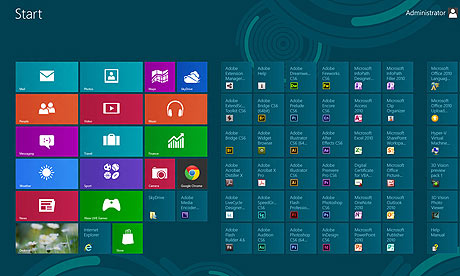


                        FYI - I installed StartisBack software and I have never touched metro again. A ssomeone who works I live off the start menu. Metro is a useless grouping that forces users to use Microsoft apps that no one uses ever.

                        Comment

                        • anexsia
                          Confirmed User
                          • May 2010
                          • 5735

                          #13
                          Why not just install a copy of Windows 7?

                          Comment

                          • Sunny Day
                            Confirmed User
                            • Dec 2010
                            • 1406

                            #14
                            Mac Air

                            Originally posted by MarkPrince
                            It's time you bought a real computer with an operating system that isn't plagued with nightmarish security problems and endless frustration: Be extra good to yourself this weekend and buy a Macbook Air. You will love it.

                            http://www.apple.com
                            Mac Air, best machine there is. Leaving my Mini to go back to a new Air. As for Windows, run Parallels for programs like ACT! Or crazy run Windows 97 Excel . So much better than any newer version of Excel windows or Mac.

                            Run an Air with a cheap large monitor, mouse & external keyboard and use a iPad Mini on the go and it's the best combo ever. Use an iPad Mini with Verizon as they have the best US coverage there is. AT&T claims coverage, but that's a fucking lie.

                            Comment

                            • MPGdevil
                              Confirmed User
                              • Nov 2005
                              • 1210

                              #15
                              Originally posted by clickhappy
                              Ok

                              1. You plug in an external hard drive drive, how do you access the files on the drive with Windows 8?
                              On windows 7 I use Start > My Computer > E: drive or whatever. Its easily accessible.
                              How do I access "My Computer" on windows 8?


                              2. I pulled something off the drive and want to put it in my Windows Programs folder. How do I put a file in the programs folder? I dont know because I cant find "my computer" easily.


                              3. I want to uninstall a program, where is control panel?
                              On windows 7 It's easily accessible: Start > control panel. Where is it on Windows 8?


                              4. On Windows 8 you have to use Metro to access your programs, and they are scattered in big boxes from left to right. What do you do if you need to go to the right? You have to keep hitting your mouse to the right side of your screen to scroll right, which is incredibly retarded.
                              Windows 8 assumes you have a touch screen that you can just scroll it with your finger, but what if you dont?

                              5. You cant open up an app twice. If I use calculator and want 2 calculators going at the same time, as I often do, I cant do that. I can only open 1 at a time.

                              6. On Windows 8 the metro screen looks OK color-wise with how Microsoft organizes it, but thats with Microsoft apps only in front of you. If you dont want X-Box games, MS Store, Windows Messaging, Internet Explorer (yuck), Microsoft Mail, you have to move tiles around.
                              You have to put new tiles in to replace the old ones, and you cant change the color of your tiles.
                              So now if you put YOUR software front and center then your home screen is ALL blue tiles.
                              If you dont use the way microsoft laid it out for you and you need to customize it, then your metro screen looks ugly
                              like this on the right side. Now imagine THAT is your main screen, all blue boxes with no way to color it.


                              FYI - I installed StartisBack software and I have never touched metro again. A ssomeone who works I live off the start menu. Metro is a useless grouping that forces users to use Microsoft apps that no one uses ever.

                              1+2.
                              Win+E or put the icon on your desktop.


                              3.
                              Windows 8: Right-click lower left hot corner
                              Windows 8.1: Right-click Start button

                              4.
                              You can make a Quick Launch bar like in Vista if you don't wan't to have shortcuts on desktop or in folder on desktop.
                              It can be moved, resized and customized in different ways.


                              5. Yes you can - just need to run as Administrator


                              6. If you go to the All-Apps screen most programs have different colors - just Pin to Start.
                              Last edited by MPGdevil; 04-30-2014, 11:31 PM.

                              Comment

                              • Nookster
                                Confirmed IT Professional
                                • Nov 2005
                                • 3744

                                #16
                                Get any new laptop with win8...downgrade that bitch. Done.

                                Although, I originally thought I would hate Win 8...but I was ignorant as I see now. Win 8 is better. You just need to learn to use it. The powershell is very useful. It is also much easier to install sub-systems (linux) paralleled on it (depending on vendor). Find a Toshiba and you will be happy.
                                The Best Affiliate Software, Ever.

                                Comment

                                • Babaganoosh
                                  ♥♥♥ Likes Hugs ♥♥♥
                                  • Nov 2001
                                  • 15841

                                  #17
                                  I just bought an Asus t300la with Windows 8.1.

                                  http://www.asus.com/Notebooks_Ultrab...r_Book_T300LA/

                                  No joke, I really like Windows 8.1. 7 seems like an out of date antique now.
                                  I like pie.

                                  Comment

                                  • leg4
                                    Confirmed User
                                    • May 2003
                                    • 4429

                                    #18
                                    Windows 8 is a fine operating system... the best Windows ever in my opinion.


                                    Just install free "classic shell" google it. --- You'll have start/programs back again like normal.
                                    >>> Contact me here

                                    email me here

                                    Comment

                                    • nico-t
                                      emperor of my world
                                      • Aug 2004
                                      • 29901

                                      #19
                                      Originally posted by MarkPrince
                                      It's time you bought a real computer with an operating system that isn't plagued with nightmarish security problems and endless frustration: Be extra good to yourself this weekend and buy a Macbook Air. You will love it.

                                      http://www.apple.com
                                      Seriously, how much do they pay you

                                      Comment

                                      • dready
                                        Confirmed User
                                        • Oct 2002
                                        • 5247

                                        #20
                                        Win7 was released five years ago. That's an eternity in the tech world. You wouldn't buy a five year old laptop, so why run five year old software on it?
                                        ICQ: 91139591

                                        Comment

                                        • klinton
                                          So Fucking Banned
                                          • Apr 2003
                                          • 8766

                                          #21
                                          Originally posted by nico-t
                                          Seriously, how much do they pay you
                                          they give him discount for Apple parts

                                          Comment

                                          • BlackCrayon
                                            Too lazy to set a custom title
                                            • Jun 2003
                                            • 19634

                                            #22
                                            Originally posted by dready
                                            Win7 was released five years ago. That's an eternity in the tech world. You wouldn't buy a five year old laptop, so why run five year old software on it?
                                            my computer works fine with xp on it. its 12 years old. so what?
                                            you don't know you're wearing a leash if you sit by the peg all day..

                                            Comment

                                            • dready
                                              Confirmed User
                                              • Oct 2002
                                              • 5247

                                              #23
                                              Originally posted by BlackCrayon
                                              my computer works fine with xp on it. its 12 years old. so what?
                                              http://www.modern.ie/en-us/virtualiz...escape-from-xp
                                              ICQ: 91139591

                                              Comment

                                              • clickhappy
                                                Confirmed User
                                                • Mar 2004
                                                • 4027

                                                #24
                                                Originally posted by MPGdevil
                                                1+2.
                                                Win+E or put the icon on your desktop.


                                                3.
                                                Windows 8: Right-click lower left hot corner
                                                Windows 8.1: Right-click Start button


                                                6. If you go to the All-Apps screen most programs have different colors - just Pin to Start.

                                                I'm not saying you cant do it, Im saying Windows 8 made it difficult to do common things so they could put your focus on their apps instead of doing the things you need to do. How is the average home user going to know how to press Win + E? Why should I have to clutter my desktop with shortcuts because the OS is cumbersome to use?

                                                And most programs do not have different colors, when you add your own programs they are all the same color and Windows doesnt allow you to change it. Just like in that screen shot I showed.

                                                So if you want a good looking screen but want your programs to be easy to find you cant have them both.

                                                Comment

                                                • NewbieNudes
                                                  Confirmed User
                                                  • Jan 2003
                                                  • 940

                                                  #25
                                                  1. Buy a Macbook Air or MacbookPro Retina. (best notebook hardware there is, period.)
                                                  2. Run Bootcamp
                                                  3. Tell it how much of your SSD you want to allocate to windows
                                                  4. Install Windows 7

                                                  Then you have the best of both - you can choose on bootup buy holding OPTION if you want Mac or Windows and when in windows it will be running natively, not through some shitty emulator. If you only want to use windows it remembers and just boots into windows all the time.

                                                  I have been running Windows on MacAirs since the first one and they all fully support windows, even down to the brightness control buttons for screen and keyboard back lights.

                                                  FWIW Windows 8 is a P.O.S I ran it for a year.
                                                  | Click Here to join our unique high converting program

                                                  | Add yourself for free traffic!

                                                  ICQ: 279 738 569 | Skype: NewbieNudes | Email: affiliates at newbienudes dot com

                                                  Comment

                                                  • phantomd
                                                    Registered User
                                                    • Sep 2013
                                                    • 15

                                                    #26
                                                    If you are looking for a real good ultrabook, and you need a awesome keyboard than i suggest the thinkpad x1 carbon. I use this baby since approx 1 year now and i am totally happy with it. There was some cpu speedstep issues in the beginning but lenovo has fixed them now. If you don't want jump on the windows bandwagon, it works out of the box perfect with the most linux distros arround, and for sure it works aswell perfect with windows 7.

                                                    Give it a try
                                                    ICQ: 7225368 - Skype: phantomdxxx

                                                    Comment

                                                    • clickhappy
                                                      Confirmed User
                                                      • Mar 2004
                                                      • 4027

                                                      #27
                                                      Originally posted by NewbieNudes
                                                      1. Buy a Macbook Air or MacbookPro Retina. (best notebook hardware there is, period.)
                                                      theyre like $2,000 if you want a reasonable size screen http://www.apple.com/macbook-pro/

                                                      Comment

                                                      • candyflip
                                                        Carpe Visio
                                                        • Jul 2002
                                                        • 43069

                                                        #28
                                                        Originally posted by clickhappy
                                                        theyre like $2,000 if you want a reasonable size screen http://www.apple.com/macbook-pro/
                                                        But they are loaded with super special, available only to Apple parts. So they're soooo much more worth it.

                                                        Spend you some brain.
                                                        Email Me

                                                        Comment

                                                        • MPGdevil
                                                          Confirmed User
                                                          • Nov 2005
                                                          • 1210

                                                          #29
                                                          Originally posted by clickhappy
                                                          I'm not saying you cant do it,
                                                          No but you asked how to do it and I showed you it's just as quick to do as Windows 7.
                                                          When you plug in an external drive it also pop up with a box where it ask you what to do. It doesn't get simpler than that.

                                                          Originally posted by clickhappy
                                                          Im saying Windows 8 made it difficult to do common things so they could put your focus on their apps instead of doing the things you need to do. How is the average home user going to know how to press Win + E? Why should I have to clutter my desktop with shortcuts because the OS is cumbersome to use?
                                                          Well. the average user usually don't mind having the four shortcuts My Computer, Network, Control Panel and Trash Can on their desktop for easy access. It's been possible since what? XP?

                                                          And you don't have to clutter your desktop.
                                                          If you don't like or want to use Metro things could be set up like this.


                                                          Originally posted by clickhappy
                                                          And most programs do not have different colors, when you add your own programs they are all the same color and Windows doesnt allow you to change it. Just like in that screen shot I showed.

                                                          So if you want a good looking screen but want your programs to be easy to find you cant have them both.
                                                          While more customization would be nice, in Windows 8.1 or at least my OS program and game tiles have various colors. Not perfect, but at least not awful either.


                                                          Ahh fuck it.. don't know why I am even wasting my time. People aren't interested in learning new stuff or find easier alternatives. It's much easier to just complain. Just use Windows 7 or buy a fucking Mac like the Apple salesman suggest in a post somewhere above. I couldn't care less.
                                                          Last edited by MPGdevil; 05-01-2014, 08:15 AM.

                                                          Comment

                                                          • clickhappy
                                                            Confirmed User
                                                            • Mar 2004
                                                            • 4027

                                                            #30
                                                            Originally posted by MPGdevil
                                                            No but you asked how to do it and I showed you it's just as quick to do as Windows 7.
                                                            When you plug in an external drive it also pop up with a box where it ask you what to do. It doesn't get simpler than that.
                                                            Its not just as easy. Your way you have to stop what your doing and move your hands to your keyboard and push 2 keys on your keyboard in order to open up My Computer and on Win7 you can just use your mouse.
                                                            Most of the times when Im doing keyboard work I like to be able to stay on the keyboard and not have to go to the mouse (a lot of programmers are like this) and if im doing mousework I dont want to have to go to the keyboard.

                                                            And I bet you 80% of computer users arent savvy enough to know shortcut keys, they barely know ctrl+c to cut and ctrl+p to paste.
                                                            I know because I've helped a few people with their computer and when I do it they always ask "What are you doing there?" when I copy and paste.

                                                            Also the popup box appears for 3 seconds then disappears. When if I want to access my External drive later?

                                                            You just dont understand, Windows 8 is not user friendly for average users. The reason iphone/pad/pods took off is because they are EASY TO USE.
                                                            You can put them in front of a 3 year old child and they can instantly start working.
                                                            With Windows 8 the average user has to stop and ask how to find things, or read a manual in order to do basic things.
                                                            Average people want things easy to use. They tell me they "dont want a bunch of shit everywhere". and thats what windows 8 is, a bunch of shit everywhere.


                                                            Originally posted by MPGdevil


                                                            Ahh fuck it.. don't know why I am even wasting my time. People aren't interested in learning new stuff or find easier alternatives. It's much easier to just complain. Just use Windows 7 or buy a fucking Mac like the Apple salesman suggest in a post somewhere above. I couldn't care less.
                                                            Dude right on your own desktop, take those Microsoft apps on the left side out that you dont use (I bet you dont use most of them), push the programs you DO use front and center, NOW tell me how it looks.
                                                            On my screen it was all green tiles on a blue background, i hated it.

                                                            You cant change tile colors without hacking regedit. Tell me what regular computer users can do that?
                                                            http://www.addictivetips.com/windows...ground-colors/

                                                            I have Windows 8.1 update. I right click on a tile and there is no "Personalize" to edit it. So, I guess, I have to find the personalize section. Fucking great, now I have to hunt around to find it because God knows where "Personalize" it is. So I move my mouse to the right side of the screen and the charms bar doesnt show up. how do I get it?
                                                            On a touch screen I swipe in, but what if my screen isnt touch?
                                                            Nightmare.

                                                            Anyways the original question was What can Windows 7 do what Windows 8 fucks up and I gave good examples of how Windows 8 makes it frustrating and complicated for regular pc users.
                                                            Last edited by clickhappy; 05-01-2014, 09:06 AM.

                                                            Comment

                                                            • HomerSimpson
                                                              Too lazy to set a custom title
                                                              • Sep 2005
                                                              • 13826

                                                              #31
                                                              just take one with Win8.1 and customize it with plugins to look how you want it (or like Win 7).

                                                              Free apps that add Win7 menu to Win8:
                                                              http://www.filehorse.com/download-start-menu-8/
                                                              http://www.filehorse.com/download-classic-shell/
                                                              Make a bank with Chaturbate - the best selling webcam program
                                                              Ads that can't be block with AdBlockers !!! /// Best paying popup program (Bitcoin payouts) !!!

                                                              PHP, MySql, Smarty, CodeIgniter, Laravel, WordPress, NATS... fixing stuff, server migrations & optimizations... My ICQ: 27429884 | Email:

                                                              Comment

                                                              • pornguy
                                                                Too lazy to set a custom title
                                                                • Mar 2003
                                                                • 62910

                                                                #32
                                                                I have a new Alien and it has 7 .
                                                                PornGuy skype me pornguy_epic

                                                                AmateurDough The Hottes Shemales online!
                                                                TChicks.com | Angeles Cid | Mariana Cordoba | MAILERS WELCOME!

                                                                Comment

                                                                Working...
