-
lol, understandable but, pretty dumb -
Comment
-
It's funny how you have to make shit up to make fun of a Mac, but with Windows, all you need is the actual screenshot to do the same.Comment
-
Comment
-
.
.
Arguing with a troll is a lot like wrestling in the mud with a pig, after a couple of hours you realize the pig likes it.Comment
-
Me: Damn, why do apple people get so defensive about their OS?
vista: nestle posted a question, confirm or deny.
Me: confirm.
vista: nestle confirmed a request to confirm a question post, confirm or deny.

Jokes aside, only opinion I have of Apple is... the click wheel is genius.Comment
-
Here's a screenshot on OS10.4.9 which gives a stop/continue dialog with the same text.
http://www.flickr.com/photos/56953868@N00/435542840/
(options are still incomplete - IMO)
Taken from WTF:
Instructions for reproducing the error on a Mac whose boot drive is formatted as normal (i.e. case-insensitive) HFS+:
(note that this will replace any file named "CaseSensitiveTest.dmg" on your desktop, if you have one and it isn't already open):
Open Terminal and type the following (on one line, if it comes through as two):
hdiutil create -size 5m -fs HFSX -volname CaseSensitiveTest -ov -attach ~/Desktop/CaseSensitiveTest.dmg
This will create and mount a case-sensitive disk image (a 5 MB case-sensitive non-journaling HFS+ volume, if you must know) whose volume name is "CaseSensitiveTest". Now copy a small file onto the disk image, then open the disk image, duplicate the file, and give the copy a name which is identical to the original, but with a different set of cases. Now drag both files onto the desktop. You will get an error from the Finder which has the exact same icon and message as shown.Comment
-
-
Apple has never "officially" supported a Case Sensitive HFS+ volume in any official manner (note I said this twice) - it's merely an option that was there for Server, primarily, and they've outright dropped UFS support. Go go gadget nerds with too much time on their hands.Comment
-
Comment
-
Am I to surmise that Apple users can't take a joke?
I didn't make the original 'cap' and wasn't hoping to make any LARGER POINT. You've personally proved the popup (or a similar popup) is part of OSX. With one button or two, you HAVE to admit the message is verbose. Personally, I think the two button dialog is incomplete.
AT THE END OF THE DAY -- WHO CARES?????

Comment
-
Comment
-
You know those "Dummies" books? Like "Cooking for Dummies" or "Dog Grooming for Dummies" Well Macs are like "Computers for Dummies"Comment
-
Comment
-
jesus fucking christ you people act like 10 year olds fighting over whats better a grape or strawberry popsicle... they both have their own seperate qualities that make them who they are... obviously mac has something that makes people wanna pay the outragious prices for their computers, and im pretty sure windows/pc's have something that make 90% of the world want to use them.... how about you guys just stop fucking arguing and use whats best for you, if ya like mac, use a fucking mac, if you like pc, use a fucking pc, but don't go around saying yours is better then everyone elses....
Madrox, User of both PC and MacComment
-
that makes life.. hard

[Web Design | Development | Programming | Content Writing ]
ICQ: 238-890-469Comment
-
I think i see the problem...you need to upgrade from this:
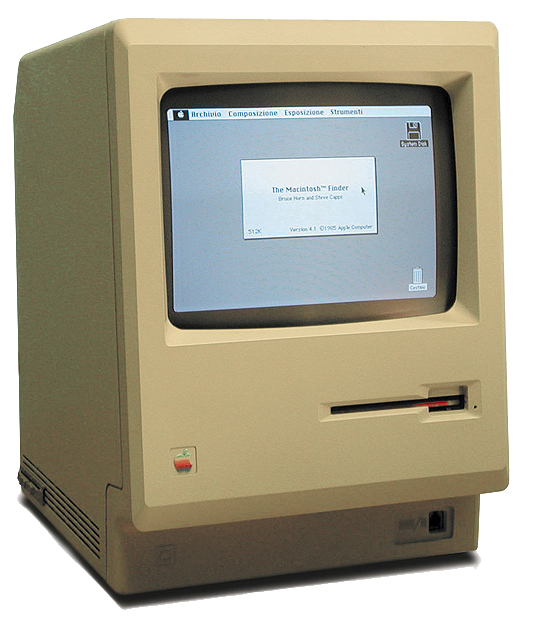
to this:


~ Webair Dedicated Cloud Servers™ ~ WEBAIR VSYS™ Virtual Hosting Platform ~ Superior CDN Network ~
~ Managed Dedicated hosting Specialists ~ DISCOUNT DOMAIN NAMES! ~ WEBAIR FUSION IO MANAGED CLOUD SERVERS! ~
ICQ: 243116321 - TWITTER - @WEBAIRINC - E-Mail: [email protected]Comment
-
That's NOT the point -
I'm an Apple user of 15 years, and I called BS on this, yet when I reproduced it, I couldn't believe it. OS X steps a long long way from the sacred Apple Human Interface Guidelines, that gave Apple the 'Simple & Elegant' name. But that alert box is really taking the piss!
You know, it's ok to say 'that's fucked up' - you don't have to be an Apple FanBoy because you own a Mac...
For coding work - hit me up on andy // borkedcoder // com
(consider figuring out the email as test #1)
All models are wrong, but some are useful. George E.P. Box. p202Comment



 264-580-554

 AIM: GrouchyGfy
Comment